

Published: 3 August 2023
Updated: 6 February 2026
In this article, you’ll learn:
Manufacturing teams manage product truth across dozens (sometimes thousands) of SKUs, plants, suppliers, regions, and sales channels. One outdated datasheet, wrong packaging file, or “almost correct” product photo can turn into rework, returns, compliance risk, and a lot of awkward emails.
A Digital Asset Management (DAM) platform for manufacturing is a central system for storing, organizing, versioning, and distributing every asset tied to a product — from engineering visuals to sales-ready content. The point is making sure the right people (and partners) can find the right file fast, and it’s the approved, current version.
Manufacturing is harder than many other industries because your assets sit at the intersection of:
- complex product data (variants, materials, certifications, spec changes),
- many stakeholders (product, engineering, marketing, legal, distributors, agencies),
- high cost of mistakes (incorrect specs, outdated safety docs, wrong labels, expired rights).
Short Definition
A manufacturing DAM is a system that stores and organizes all product-related files in one place — with metadata, version control, and permissions — so teams and partners can always find and use the latest approved asset.
Why Manufacturing is Harder Than “Regular” Asset Management
In manufacturing, assets are tied to real-world product complexity: SKU variants, spec updates, compliance documents, regional requirements, and long supply chains.
The same product can have different labels, manuals, and imagery by market — and one outdated file can mean rework, delays, or even regulatory risk. That’s why manufacturing teams need stronger governance: clear ownership, approvals, audit trail, and controlled distribution to dealers, distributors, and agencies.
What Counts as Manufacturing Digital Assets
A manufacturing DAM ends up being the “everything library” — the place people go when they need the exact latest file.
It’s CAD and drawings. It’s the 3D render that matches the current revision. It’s photo sets and variants (colorways, finishes, sizes). It’s packaging artwork with the right language version. It’s manuals, datasheets, certificates, and compliance paperwork.
And then there’s the stuff that makes work move faster: channel-ready packs for distributors, retail signage for trade shows, service guides for repairs — plus rights and expiry info so nobody ships an asset they’re not allowed to use.
Top Manufacturing DAM Use Cases
1) Product launch packs for dealers and distributors
When a new product drops, partners need a ready-to-use kit: approved images, spec sheets, manuals, and key messaging. A DAM lets you publish a single launch pack and update it once — everyone pulls the same “current” version.
2) “Single source of truth” for specs and listings
Specs change. And they rarely change everywhere at once. A DAM helps teams keep one authoritative set of datasheets, declarations, and product visuals, so web listings, catalogs, and partner portals don’t drift apart over time.
3) Managing variants without chaos
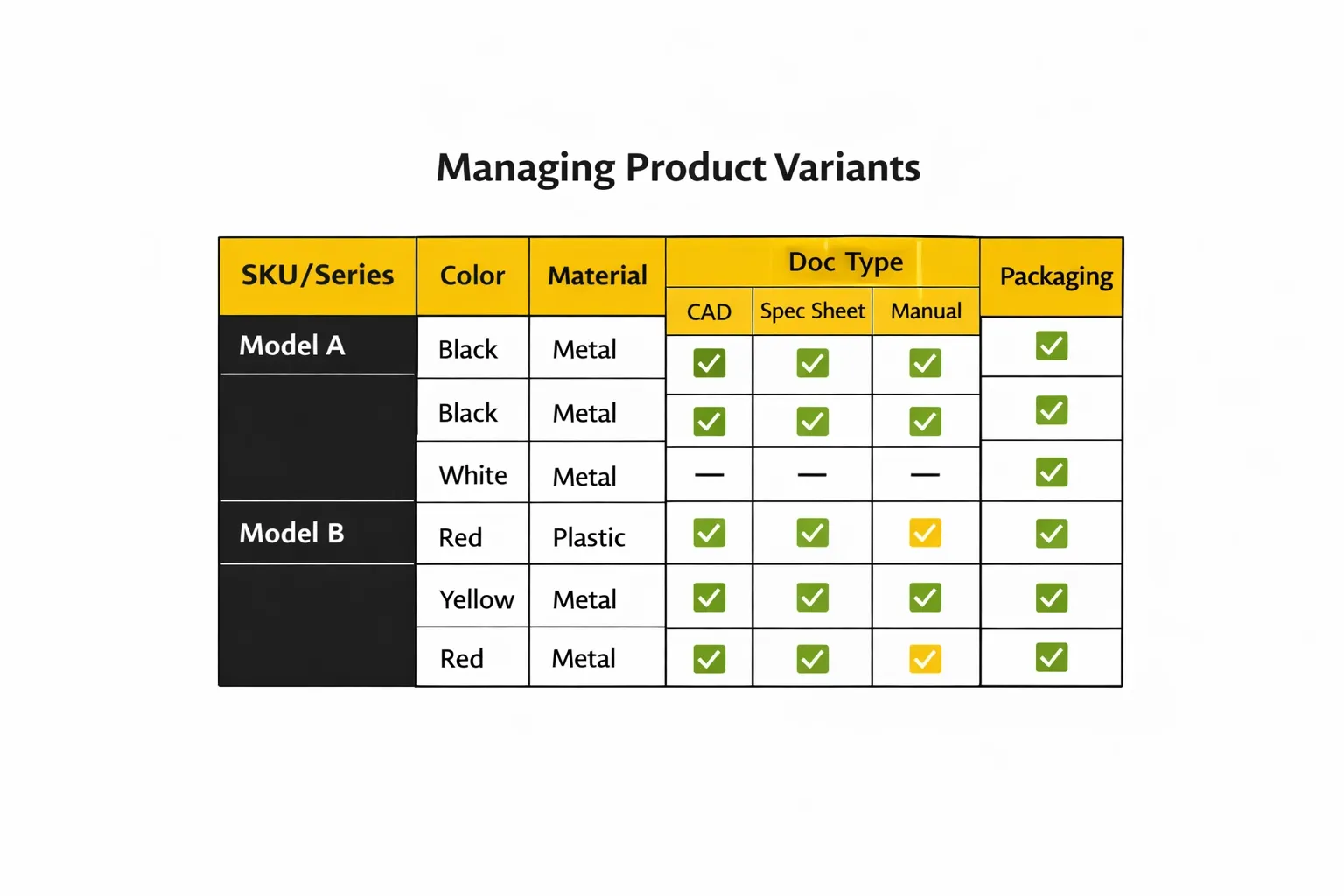
Colorways, materials, regional SKUs, bundles — manufacturing content is rarely one-size-fits-all. With structured metadata (SKU/series/region), teams can quickly filter and export the right asset set for the right variant without manual hunting.
4) Localization + “current version” control by region
Different markets often mean different labels, manuals, compliance docs, and sometimes different visuals. A DAM makes it possible to keep localized assets side-by-side and distribute them by language/region, while retiring outdated versions cleanly.
5) Partner sharing without email threads and expired links
Manufacturers constantly share assets with agencies, retailers, marketplaces, and installers. With portals and permissioned links, you can provide partners access to only what they’re allowed to use, without exposing internal drafts or irrelevant libraries.
6) Approvals for regulated and customer-facing materials
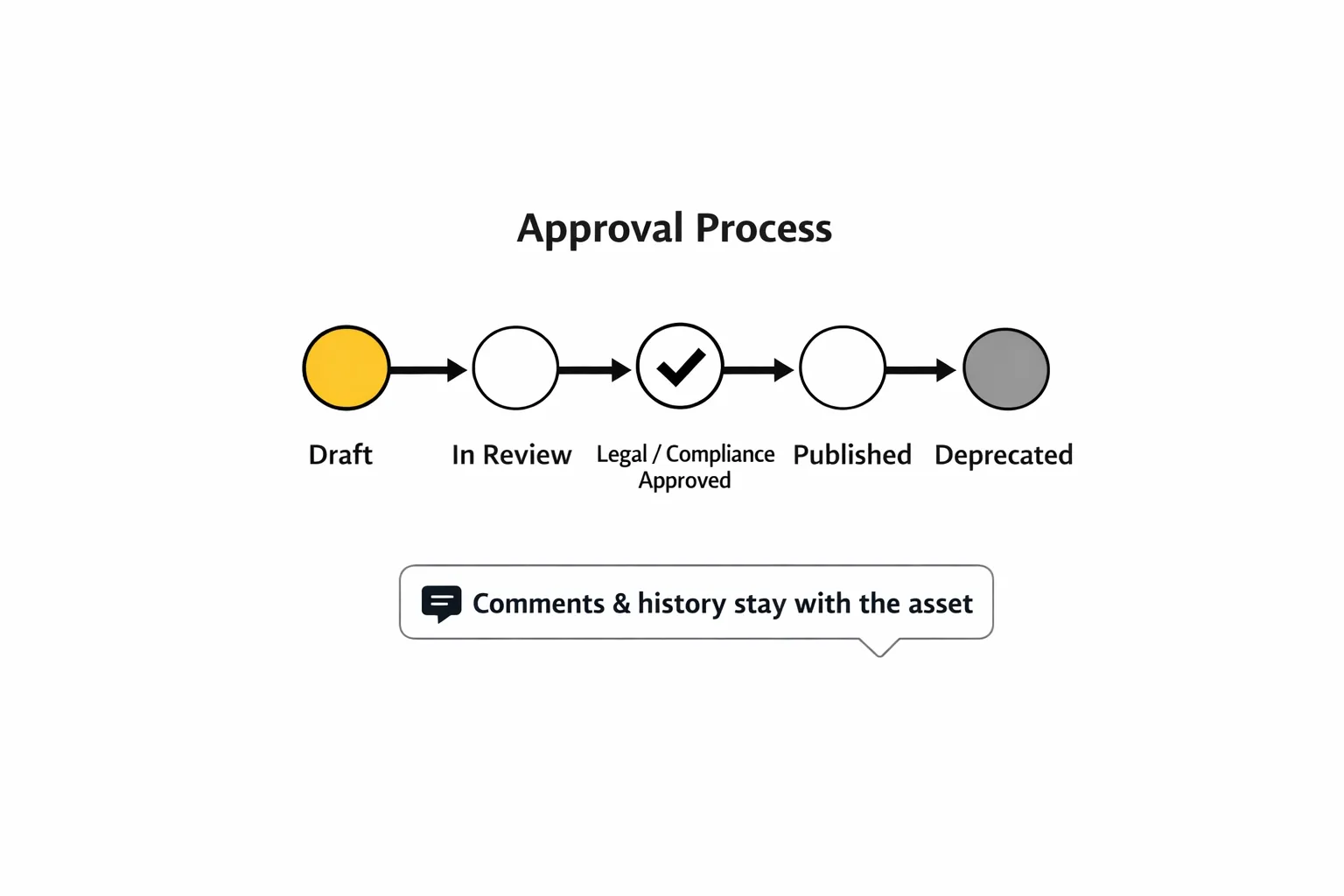
Packaging, safety sheets, instructions, and claims-heavy marketing collateral often require sign-off. A DAM keeps approvals attached to the file (status, comments, history), so teams don’t have to guess what’s “okay to publish.”
7) Supporting sales and service teams with “ready-to-send” assets
Sales needs accurate decks and one-pagers. Service needs repair guides and parts visuals. A DAM helps internal teams find and reuse the correct materials fast — especially when someone needs an answer “while on a call.”
8) Replacing folder archaeology with structured search
Instead of remembering where something lives, teams search by product line, SKU, region, doc type, or lifecycle stage — and reach the right file in seconds, even when the library grows for years.
How to set up a manufacturing DAM
Step 1. Audit what you have (and what keeps breaking).
Before you redesign anything, get a clear picture of what’s already in motion.
Where do your spec sheets live? Who owns manuals and certificates? How does packaging artwork travel from agency → approval → print?
You need clarity on the handful of asset types that cause the most pain when they’re outdated or hard to find. In manufacturing, that’s usually specs, manuals, packaging, and product visuals.
Step 2. Build a metadata model that matches how your products work.
This is where many DAM rollouts fail: teams import thousands of files, but they can’t reliably answer a simple question like “show me the approved images for SKU X in Germany.”
Your metadata should reflect product reality: product line, SKU or internal ID, variant attributes (color/material/size), region/language, and a clear lifecycle status (draft, approved, deprecated). Keep it minimal at first. The goal is a system people trust.
Step 3. Set roles and access rules before you invite partners.
Manufacturing teams don’t work in a closed loop. Sales, service, legal, distributors, agencies, resellers — everyone touches assets, but not everyone should see everything.
Define who can upload, who can approve, who can publish externally, and who can only download approved materials. When you get this right, your DAM becomes a safe “source of truth” instead of another folder someone is afraid to open.
Step 4. Make approvals lightweight, but non-negotiable where it matters.
You do need a consistent process for assets that carry risk: packaging files, manuals, safety documents, anything with claims or compliance. The simplest workable setup is: an owner, a status, and a clear rule for what happens to the old version. If teams can’t tell what’s approved in one glance, they’ll fall back to Slack and email.
Step 5. Connect the DAM to the tools people already use.
If your assets already live in cloud storage, make syncing and updates seamless. If designers work in Adobe tools, reduce the “download → edit → re-upload” loop.
Step 6. Train by real scenarios, not by features.
Adoption happens when someone saves time this week. Teach the team how to do the things they do every day: find the right variant set, update a datasheet and retire the old one, publish a dealer pack with the correct access, pull the latest approved packaging file without guessing. Once people experience “I can trust this,” the system sticks.
AI Features
AI is most valuable in manufacturing when it speeds up what humans hate doing: repetitive labeling, searching across messy libraries, and digging through long videos.
AI keyword tagging helps you get more value from legacy content and imperfect metadata. It can suggest searchable keywords for images and videos so people can find assets faster — even if the original uploader didn’t tag everything correctly.
Video transcription turns assembly videos, trainings, and demos into usable knowledge. When a recording becomes searchable, it stops being a black box. Teams can jump to the exact moment they need, reuse internal know-how, and share clearer answers with partners without rewatching the whole thing.
Analytics show what’s actually happening in the library. Which assets get downloaded by distributors? Which packs are ignored? What content keeps being searched for but not found? That feedback loop helps you improve the structure and keep the library clean as it grows.
Conclusion
Manufacturing asset management is hard because products evolve, variants multiply, and content needs to stay accurate across regions and partners. A DAM solves that when it becomes a trusted system: the latest approved version is easy to find, easy to share safely, and hard to accidentally replace with something outdated.
If you’re planning a rollout, don’t start by importing everything. Start with one product line, a minimal metadata model, and a few high-risk workflows. Build trust first — then scale.
FAQ
Is Google Drive/ SharePoint enough for manufacturing assets?
It works for storage, but it usually breaks down when you need structured metadata, reliable approvals, version history, and controlled distribution to partners.
What’s the best place to start?
Start with the asset categories where mistakes are expensive: spec sheets, manuals, safety docs, and packaging.
How do we handle product variants without creating duplicates?
Tie assets to a consistent product ID (SKU/internal code), add variant attributes, and make “approved vs deprecated” visible. That’s what keeps variants searchable without cloning folders.
Who should own the DAM?
Typically Marketing or Product owns the system, while Engineering and Compliance own specific asset categories and approval rules.
How do we share assets with dealers and agencies safely?
Use portals or permissioned links so external users see only what they’re allowed to use — and only what’s approved.
Did you enjoy this article? Give Pics.io a try — or book a demo with us, and we'll be happy to answer any of your questions.
Author

Vladimir Mikheev is a DAM consultant and a regular contributor to the Pics.io blog. Since 2019, he has helped 400+ organizations adopt digital asset management and streamline their workflows. He’s delivered 900+ demos and worked with sales, marketing, and product teams to align on shared processes.


