


Published: September 7, 2025
Last updated: March 10, 2026
In this article, you’ll learn:
Your team has recorded 300 webinars, 150 customer interviews, and 200 internal training sessions over the past three years. They live in your DAM. And right now, finding a specific moment where your CMO explained the new brand strategy to a regional team requires someone to remember approximately when it happened — and then scrub through the video manually.
This is the reality of video asset management in 2026. Storage is cheap, but search is broken.
Speaker recognition changes this, as a working feature inside modern DAM systems, including Pics.io. This article explains how the technology works, why it matters specifically for teams managing large video libraries, and what it actually looks like when you use it.
The Real Problem with Video Libraries
Most marketing teams have a video problem that nobody openly talks about: they produce a lot of video content, archive it somewhere, and then effectively lose it.
Because finding the right moment in the right file is so painful, teams default to re-recording rather than reusing. Or they just don't bother.
Much of recorded video ends up underused because teams cannot quickly find the exact speaker, quote, or moment they need.
The root cause is simple: video is the only major content format that can't be searched by its actual content. You can full-text search a document. You can visually scan a photo. You can read a spreadsheet. A video file is a black box — the only thing you can search is whatever metadata someone added at upload time, which in most organizations is a filename and maybe a date.
Speaker recognition breaks open that black box. It makes the people inside your videos searchable — automatically, without anyone manually tagging anything.
What Is Speaker Recognition
Speaker recognition is a technology that identifies who is speaking in an audio or video file based on the unique characteristics of their voice — pitch, cadence, and the specific shape of their vocal tract. Think of it as a fingerprint, but for a voice.
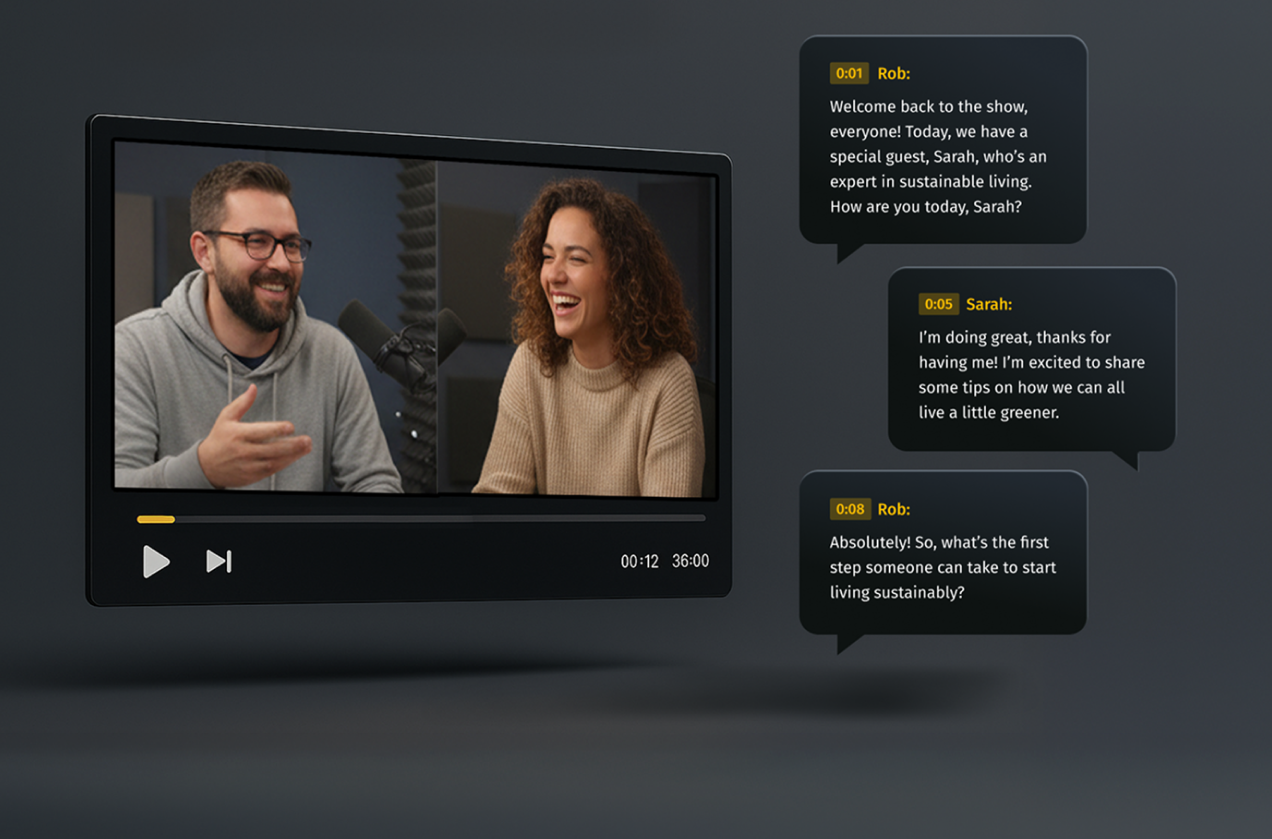
In the context of a DAM, it works like this: the system learns what each person sounds like. From that point on, every time a video is processed, it automatically identifies which enrolled person speaks — and exactly when.
Speaker Recognition vs. Speech Recognition vs. Voice Recognition: What's the Difference?
These three terms get mixed up constantly — even by people who work in tech. Here's the practical distinction:
| Technology | Question it answers | Output | How it’s used |
|---|---|---|---|
| Speaker recognition | Who is speaking? | Person’s name/identity label | Tag videos by person, enable person-based search |
| Speech recognition | What is being said? | Text transcript | Make spoken content searchable by topic or quote |
| Voice recognition | Is this the authorized person? | Yes/No (authentication) | Not typically used in DAM — this is for security systems |
In Pics.io, speaker recognition and speech recognition work together. The transcription tells you what was said. The speaker labels tell you who said it. Together, they give you the most powerful video search possible: find every moment where a specific person talked about a specific topic.
How Speaker Recognition Actually Works
You don't need to understand the math to use this effectively. But a basic mental model helps you get better results.
Step 1: The system learns what people sound like
People do not sound exactly the same in every recording, but their voice still has recognizable traits. With a clear enough sample, the system can learn those traits and match the same person again in later videos.
Step 2: New videos get analyzed and labeled
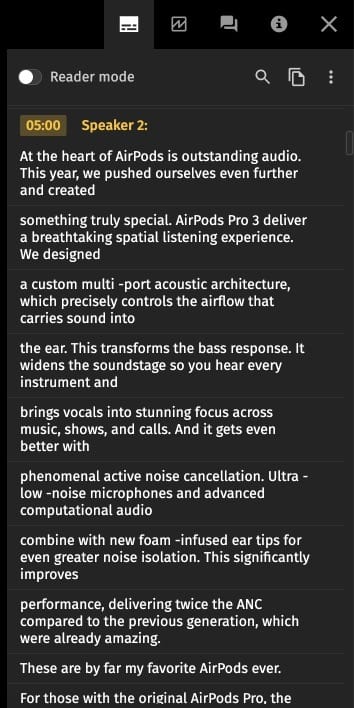
When a video is processed, the system starts by separating spoken audio from everything else, such as silence, music, or background noise. Second, it identifies where one speaker stops and another begins — this is called speaker diarization. Third, it matches each speech segment against the enrolled voice profiles and assigns an identity label to each segment.
The output is a timeline map of the entire recording: who spoke and when.
Text-Independent Speaker Recognition: Why Your Old Videos Are Already Covered
There are two types of speaker recognition systems, and the difference matters a lot for how useful the technology is in practice.
Text-dependent systems require the speaker to say a specific phrase — “my voice is my password” or a similar phrase. They're highly accurate for authentication use cases (phone banking, secure building access), but useless for processing existing recordings where nobody was asked to say any particular phrase.
Text-independent speaker recognition works on any natural speech, regardless of what the person is saying. This means two things for your video library:
- Your entire historical archive can be processed retroactively. Every recording you already have, going back years, becomes searchable by the speaker without re-recording anything.
- Enrollment works from any existing video or audio clip. You don't need a dedicated recording session — a clip from a previous meeting, interview, or presentation is enough.
How Pics.io Turns Video into Searchable, Speaker-Labeled Content
Here's the full workflow — from zero to a searchable video library.
Step 1: Upload your video
Add any video or audio file to your Pics.io library the same way you'd add any other asset. The moment the file is uploaded, transcription and speaker detection start automatically in the background.
What happens automatically
Pics.io transcribes the audio into text and simultaneously runs speaker diarization — detecting where one speaker stops and another begins. Both happen without any input from you. By the time you come back to the file, it's already done.
Step 2: See who's speaking — and when
Open the processed video. Below the player you'll see a diarization timeline: a map of the entire recording, broken into segments labeled Speaker 1, Speaker 2, Speaker 3, and so on. Each segment shows exactly when that person spoke.
The transcript alongside the timeline shows what was said, attributed to each speaker. You can read through the transcript or scan the timeline — both give you a complete picture of who said what, and when.
Step 3: Rename speakers to real names
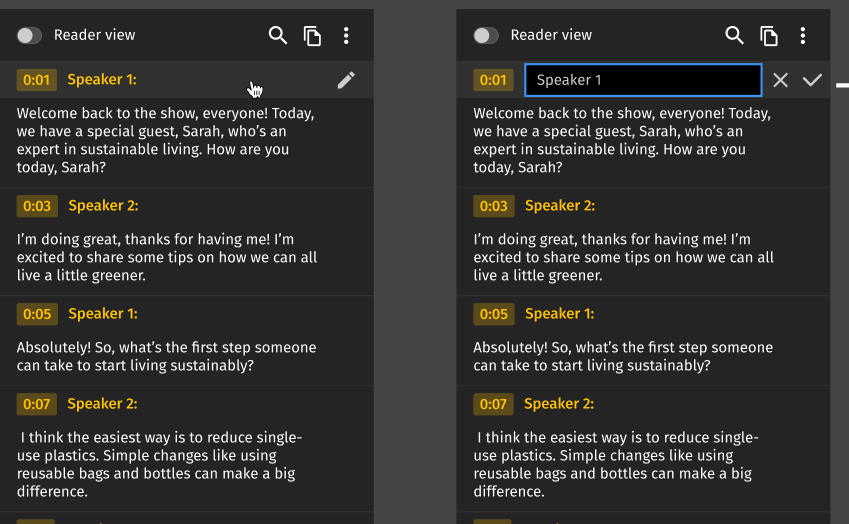
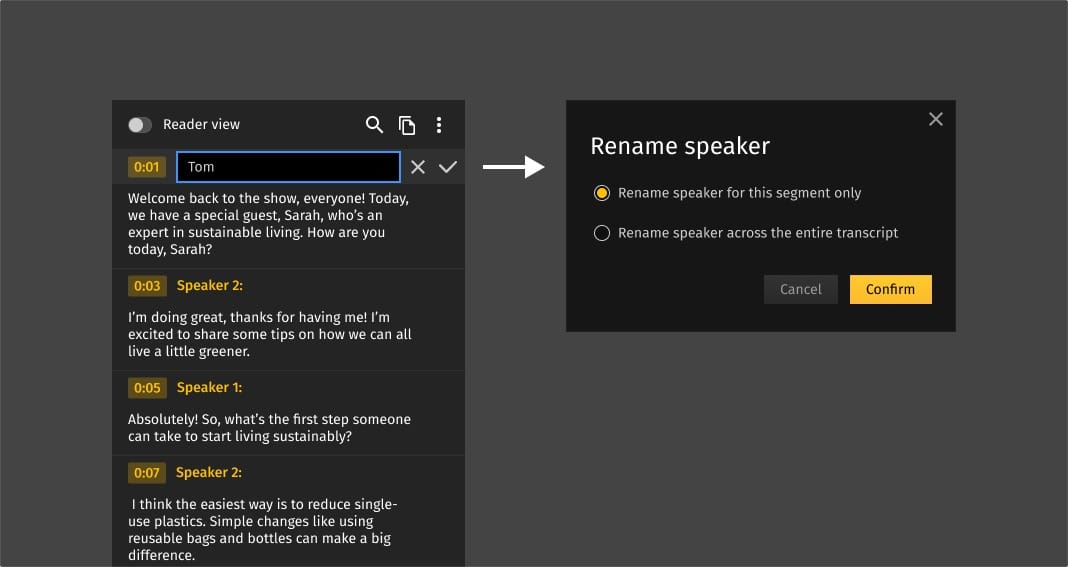
By default, the system labels speakers numerically — Speaker 1, Speaker 2. You know who these people are; the system doesn't yet. Click on any speaker label and type in the real name. Do this once per person per video, and that name becomes searchable metadata immediately.
Step 4: Find any moment across your entire library
Once speakers are named, those names become searchable across your entire video library — just like any other metadata field. Search for a person's name and instantly see every video they appear in.
Open any result and the diarization timeline shows exactly where they speak. Click their segment to jump to that moment.
Step 5: Fix mistakes when you see them
Automated speaker detection isn't perfect — occasionally two speakers get merged, or a quiet segment gets misattributed. If you notice an error, click the segment and reassign it to the right person. That's it.
Who Actually Needs This: Real Use Cases
Speaker recognition in a DAM isn't for everyone. But for teams in specific situations, it solves a problem that nothing else addresses as directly.
Marketing teams with large video archives
Webinar recordings, executive interviews, event recordings, customer testimonials, product demos. Most marketing teams accumulate hundreds of hours of video over a few years — and use maybe 10% of it, because the other 90% is functionally unsearchable.
Speaker recognition makes the entire archive useful. Every past recording with an enrolled speaker becomes findable content — for social clips, sales enablement, internal comms, or just answering 'didn't we cover this somewhere?'
Content teams repurposing video for multiple formats
A 45-minute keynote may contain only eight genuinely shareable moments. Finding those moments currently means watching the whole thing or hoping whoever recorded it added useful timestamps. Speaker recognition and transcription change the workflow entirely: filter by speaker, scan the transcript for relevant topics, and clip the segment. What used to take an hour takes ten minutes.
Agencies managing video content for multiple clients
When you're managing video assets for five or ten clients, keeping track of which person appears in which recording becomes a real operational problem. Speaker profiles in a DAM let you maintain separate speaker libraries per client and search across all their video content by person — without mixing up who's who across accounts.
L&D and internal communications teams
Corporate training libraries and internal video content suffer from the same searchability problem as marketing archives, with an added challenge: the people who recorded the content often aren't the people who need to find it later. Speaker recognition makes it possible for an employee who joins two years after a training was recorded to find all content from a specific internal expert — by name, not by hoping the filename is descriptive.
Media and publishing companies
News archives, interview libraries, podcast back catalogs — any organization with a large volume of recorded conversations benefits from being able to search by participant. Speaker recognition turns a flat archive into a structured, searchable database of who said what.
What Speaker Recognition Doesn't Do Well
Any article about a feature that only mentions the upsides is either a product brochure or wishful thinking. Here's what to actually expect.
Bad audio = worse results
The system works well on typical Zoom or Teams call quality, in-person recordings with a decent microphone, and most professional video content. It works noticeably worse on phone recordings, heavily compressed audio, recordings with loud background noise, or anything recorded at a trade show or loud event.
Similar voices sometimes confuse the system.
Two people with genuinely similar vocal characteristics — occasionally family members, sometimes people from the same regional background — can get mixed up. In a library of 20–50 speakers, this rarely comes up. In very large libraries with hundreds of enrolled people, it's more common.
Overlapping speech is hard.
When two people talk at the same time, diarization gets uncertain. Most interviews, presentations, and moderated panels are fairly easy to handle because people usually speak one at a time. Messier conversations with interruptions and people talking over each other tend to need more review.
Speaker Recognition: Why This Works Now When It Didn't Five Years Ago
Speaker recognition has been a research field since the 1960s. The reason it's showing up in tools like DAMs now — and actually working reliably — comes down to three things that converged around 2022–2023.
- Neural network approaches — particularly transformer-based speaker embedding models — are dramatically more robust to real-world audio than previous-generation systems. They handle accents, noise, and varying recording conditions much better.
- Processing audio at scale with neural networks used to require significant dedicated infrastructure. Cloud AI services made it accessible enough to integrate into applications that aren't AI companies.
- Platforms can now integrate production-quality speaker recognition via APIs without training their own models — meaning the underlying technology in tools is genuinely state-of-the-art, not a simplified version built in-house.
The practical result: the AI speaker recognition available in 2026 is qualitatively different from what existed even three years ago. Accuracy on real-world corporate audio — accented speech, Zoom call quality, multi-person discussions — has improved enough that it went from “interesting research” to “reliable operational tool”.
FAQ
What is speaker recognition?
Speaker recognition lets a system work out who’s speaking in a recording by analyzing the voice itself. In a DAM, that gives you a much more useful way to search video: not just by title or upload date, but by the actual people in the file.
What is the difference between speaker recognition and speech recognition?
They do different jobs. Speech recognition listens for the words and turns them into text. Speaker recognition focuses on the voice and works out who said those words. One helps you search for a phrase. The other helps you find the person behind it.
What is speaker diarization in speech recognition?
Speaker diarization is what separates a recording into individual speaker segments. Instead of getting one continuous transcript, you can see who is talking at each moment and move through the conversation much faster.
Does speaker recognition work on existing recordings?
Yes. Modern speaker recognition can work on recordings you already have, not just new uploads. That means older webinars, meetings, interviews, and training videos can still become more searchable, as long as the audio quality is good enough for the system to separate and analyze voices.
What affects speaker labeling accuracy?
Audio quality has the biggest impact. Clear speech, low background noise, and minimal overlap between speakers usually lead to better results. Accuracy can drop when people talk over each other, use weak microphones, join from noisy spaces, or sound very similar to one another.
Did you enjoy this article? Give Pics.io a try — or book a demo with us, and we'll be happy to answer any of your questions.


