

In this article, you’ll learn:
Have you ever spent hours searching for the right phrase or number mentioned during a meeting? Important information gets lost in tens of hours of video. If you need to find something, teams need to rewatch whole chunks to capture a single moment, then write “after-the-call” notes from memory (or not at all). The result is predictable: key details get missed, follow-ups slow down, and the same questions keep coming up.
The bigger problem is that your knowledge stays locked inside the video. When recordings aren’t searchable, they don’t behave like real work assets.
This article is about how we improved our sales process by turning demo recordings into a searchable, analyzable dataset.
What Changed for Us
Demo calls are among our most useful sources of feedback. We took a month of demo recordings, transcribed them, and analyzed the transcripts with an LLM running within our infrastructure.
The model surfaced key moments — objections, feature requests, “why now” triggers, competitive alternatives, and the recurring phrasing and themes customers use. Then we jumped back to the transcript and timecodes to quickly verify anything that mattered.
Instead of spending 30–45 minutes scrubbing through to confirm one detail, we search the transcript, click a timestamp, and land on the exact moment.
Product can verify recurring confusion points in minutes. Sales can pull a clean example of objection handling on demand. Marketing can use customer language patterns without having to guess.
Over time, we started treating one month of demos as a dataset. At the end of each month, we export transcripts and run them through an LLM to surface patterns — what keeps coming up, where the demo gets stuck, and which messages customers respond to most. LLM output is used to surface patterns; humans verify in transcripts before acting.
That simple loop unlocked a lot:
- Product got sharper input: repeated confusion points, evidence-backed requests, and specs written in customer language.
- Sales got more effective: searchable objection snippets, a tighter demo flow, and coaching notes based on what actually works.
Who This is For
This use case is for teams that store large volumes of video in a DAM and need to find answers quickly. It’s especially useful for:
- Marketing (interviews, agency calls, briefs, campaign reviews);
- Sales (demo calls, deal reviews, objection handling);
- Product & Customer Success (customer calls, feedback, feature requests);
- HR & Enablement (training, onboarding, workshop recordings);
- Operations / Production (instructions, QA or incident reviews, internal reports)
How It Works
It started with a familiar problem: we had plenty of demo recordings but almost no reuse. Great questions, objections, and product feedback were sitting in videos, and extracting anything useful from them took too much time.
So we made one small change: we started analyzing every demo recording.
Once the video is uploaded to Pics.io, you can generate a transcript in one of two ways: automatically in the background (if enabled) or manually on demand. When it’s ready, it appears right next to the video with timecodes.
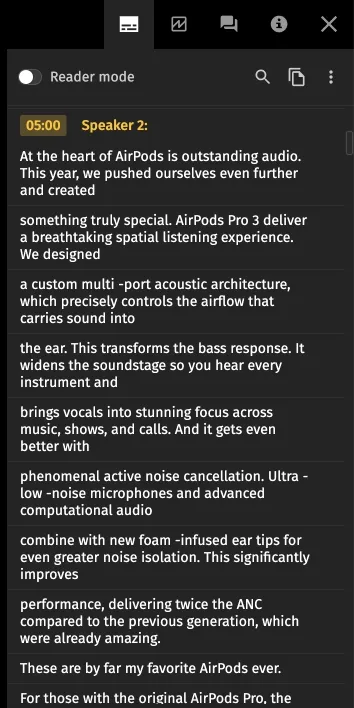
That’s the moment the call becomes usable. Someone can skim the text, search for a phrase, click a timestamp, and land on the exact moment in the recording.
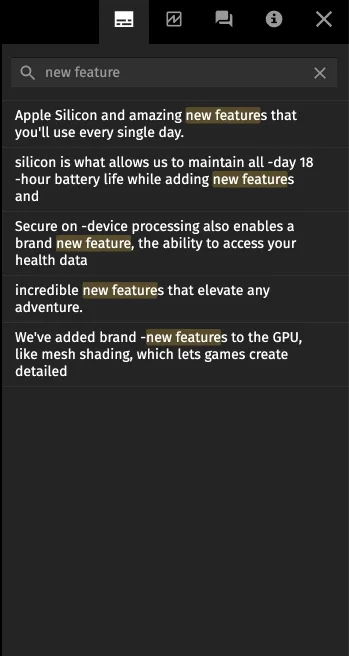
Pretty quickly, the team started using demos as a reference point. A product manager wants to confirm a recurring confusion in the UI. A sales lead needs a clear example of how to respond to a pricing objection. Marketing wants to know how customers describe the problem. The transcript makes those answers easy to find and easy to verify.
We started treating them as a dataset.
At the end of the month, we export a batch of transcripts and run analysis in an LLM to surface themes — common objections, repeated feature requests, where the demo flow gets stuck, and which phrases customers react to.
The output is a fast map of where to look. Then we jump back into the transcripts and timecodes to validate and pull real snippets.
That’s where the compounding effect shows up:
- Sales gets practical coaching material, a tighter demo structure, and ready-to-reuse objection snippets.
- Product gets evidence-backed feature requests and specs written in customer language.
- Marketing aggregates language patterns (themes, repeated phrasing) to improve positioning, FAQs, and landing pages.
Over time, demos became a feedback loop the whole team could use. Here’s the process we started using inside Pics.io.
Step 1: Upload the demo to Pics.io
We upload recordings to Pics.io. That gives us:
- a single, structured library (by month, rep, segment, or deal type);
- reliable access for the people who need it (sales lead, product, marketing);
- a workflow that doesn’t break when someone leaves the company.
Step 2: Review calls fully, then jump to the exact moments later
This is where we felt the first real productivity jump. Because we stopped losing time after the review.
When you do a proper call review, you still watch it end-to-end: tone, engagement, what’s happening on screen, how the lead reacts, and what the rep does in the product. The transcript becomes the “fast-forward” tool later — when you need to confirm one detail, pull a quote, or find the exact promise in your demo library.
We don’t re-scrub through a 30–45-minute video again. We search inside the transcript and jump to the relevant moment — with the context still attached to the original recording.
Also: transcripts are a lifesaver when audio is hard to follow — accents, speed, low-quality mic, or mixed languages. Instead of guessing, you can read, confirm, and quote the exact wording.
Step 3: Analyze many demos at once
The big unlock is what happens when you stop treating demos as isolated calls and start treating them as a dataset.
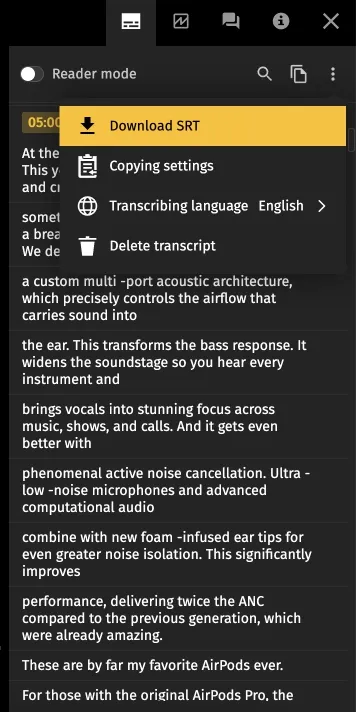
We export transcripts for a batch of demos and run LLM analysis to find:
- the most common objections and questions;
- repeated mistakes or weak spots in how the demo is delivered;
- places where we skip discovery or miss a follow-up cue;
- recurring feature requests and confusion points;
- phrasing that customers respond to best.
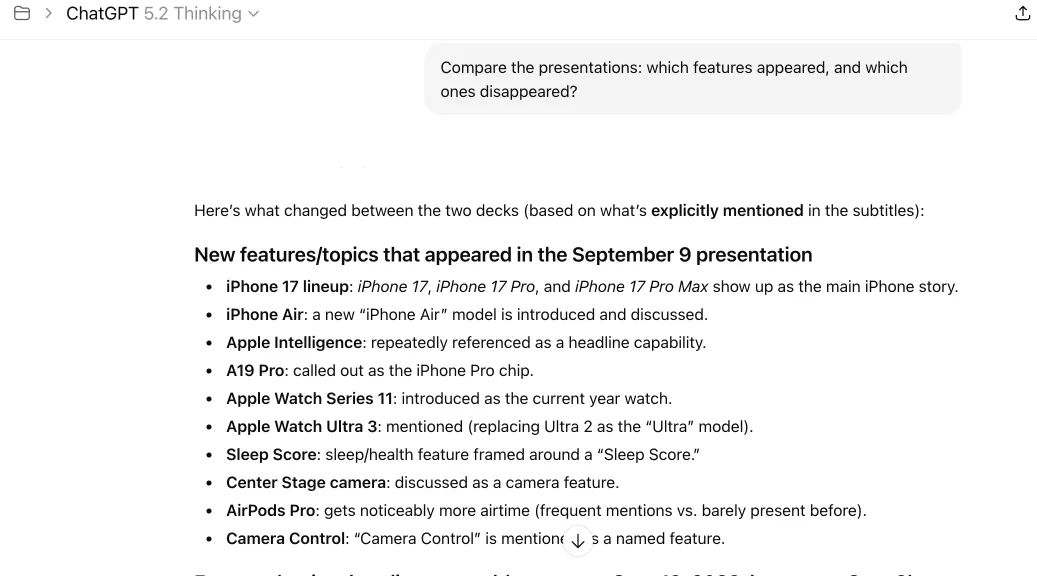
The output isn’t “truth,” but it’s an extremely fast way to surface patterns — and then validate them by jumping to the exact moments in the calls.
Step 4: Turn insights into action
This is the part most teams never reach, because their knowledge stays trapped in video.
With transcripts, search, and analysis, we can actually ship improvements:
- Sales: coaching notes, updated demo structure, objection-handling snippets, onboarding materials;
- Product: evidence-backed feature requests, repeated UX confusion points, better specs with customer wording;
- Marketing: aggregated language patterns (themes, repeated phrasing) for positioning, FAQs, and landing pages.
In other words, demos stop being “archived recordings” and start working like a feedback loop.
3 More Ways Teams Use Video Transcription in Pics.io
1) Marketing and content repurposing
Any time Marketing records customer interviews, webinars, partner calls, or campaign retrospectives, the value lies in how customers describe the problem. With transcripts, you can:
- extract phrasing themes and turn them into better FAQs and messaging;
- quickly find the “golden moments” by searching for terms like results, ROI, challenge, before/after;
- build reusable content faster: blog outlines, social snippets, email copy, without rewatching the full recording.
2) Training, onboarding, and internal enablement (a searchable video library)
Most companies have tons of training videos… that nobody re-watches because they’re hard to navigate. The video transcription in Pics.io turns them into a real knowledge base:
- new hires can search “how to…” inside transcripts and jump to the exact section;
- enablement teams can create “best practice” snippets from real calls and workshops;
- you can standardize learning by keeping transcripts next to the video, with renamed speakers and a clean structure.
This works especially well for sales onboarding, support training, and cross-team knowledge sharing.
3) Multilingual teams and localization (translate once, share everywhere)
If your team works across regions, video becomes even harder to reuse. With automatic translation into 100 languages, transcripts help you:
- make internal updates understandable for global teams without extra manual work;
- translate key parts of a call for stakeholders who weren’t on it;
- build a shared library of customer feedback across markets (then analyze it as text).
It’s a simple way to reduce language friction while keeping everything in one place inside the DAM.
ROI: a Simple Way to Estimate the Impact
Start with three inputs:
- How long does it take to find one specific moment in a 60-minute video today (scrubbing + rewatching + confirming)?
- How many videos does your team handle per week?
- How many people do this kind of “find the moment” work (sales lead, product, marketing, CS — whoever reviews calls)?
Use this lightweight model: (minutes to find “before” − minutes to find “after”) × videos per week × people × hourly cost.
Final Thoughts
Transcription is useful on its own, and the real shift happens when it’s built into your DAM workflow. Once transcripts live next to the original video (with timecodes, search, export, speaker renaming, and translation), recordings stop being “something you might watch later” and start working like a team knowledge base.
If you’re sitting on dozens (or hundreds) of demo calls, interviews, training, or internal syncs, video transcription in Pics.io helps you get that value back fast: less scrubbing, faster reviews, clearer coaching, and better product feedback.
AI & privacy note: Transcription is processed within the Pics.io infrastructure. We don’t send your recordings or transcripts to third-party LLMs for analysis. Cloud providers may host infrastructure, but they don’t get access beyond what’s needed to run the service.
Demos are recorded only with participant consent, and access is restricted to the teams who need it. We retain recordings and transcripts for a limited period in accordance with our retention policy. If you prefer a non-recorded demo, we can always run one.
FAQ
Do transcripts include timestamps?
Yes. Timecodes are added automatically, so you can jump to the exact moment instead of scrubbing through the timeline.
Can I download the transcript as a file?
Yes. You can export the transcript for analysis, documentation, or building an internal knowledge base.
Can I rename speakers?
Yes. You can rename speakers (e.g., “Speaker 1” → “Olivia”) to make reviews and coaching much easier.
Can I translate the transcript?
Yes. You can automatically translate transcripts into 100 languages — helpful for global teams and cross-region collaboration.
Is it secure? Who can access transcripts?
Transcripts follow the same access rules as the video in your DAM. Keep sensitive calls in restricted collections and share only what’s appropriate for your workflow.
Can I analyze a high volume of demos without watching them all?
That’s exactly the point. Use transcripts to search themes, export batches, let LLMs surface patterns, and validate using timecodes.
Did you enjoy this article? Give Pics.io a try — or book a demo with us, and we'll be happy to answer any of your questions.
Author

Vladimir Mikheev is a DAM consultant and regular contributor to the Pics.io blog. Since 2019, he’s helped 400+ organizations adopt digital asset management and streamline workflows, delivering 900+ demos and aligning sales, marketing, and product teams around shared processes.


