

Published: 7 April 2022
Updated: 12 January 2026
In this article, you’ll learn:
You can spot a strong brand in seconds. Even if you don’t see the full logo. Even if it’s just a slide, a thumbnail, a button style, or a headline. That instant recognition is brand recognition — and it comes from using the same brand elements again and again. In other words, this is the brand assets meaning: the reusable building blocks that make a brand instantly recognizable.
It happens when a team treats brand assets as a system: the pieces you reuse, protect, and keep consistent—so every new campaign, deck, landing page, or social post still feels like the same brand.
In this guide, we’ll explain what brand assets are, and help you set up a simple inventory so teams use the right versions without constant policing.
Brand Assets: Quick Definition
Brand assets are distinctive brand elements people associate with your company — the company’s brand assets you reuse to build brand recognition. They’re the blocks that keep your marketing and communications consistent across channels and teams.
They can be digital (logo files, templates), physical (packaging), or even audio (a short sound cue). The key is intent: a brand asset is something you intentionally use to build recognition.
For most teams, the “starter pack” looks like this: logo system, color palette, typography rules, a few templates, and a small set of messaging blocks.
Looking for the bigger picture? If you’re building a full brand marketing roadmap (positioning, channels, messaging frameworks, measurement), see our brand marketing strategy guide.
Why Brand Assets Matter
Brand assets save time in a very unglamorous way: they reduce rework. When your team has one approved set of assets—and it’s easy to find—people stop recreating basics, stop guessing, and stop shipping “almost on-brand” visuals. That’s why brand assets are important: they help maintain consistency across every marketing campaign and channel.
Without a clear system, the same issues come back: someone grabs an old logo from a deck, colors drift between channels, agencies reuse outdated files because that’s what they have, and “final-final” files multiply until nobody knows what’s current.
Brand assets fix the process around consistency. Consistency builds brand trust, which compounds into brand equity and long-term brand loyalty.
Types of Brand Assets
Most brand assets fall into three practical buckets.
- Visual identity assets are what people recognize first: logos, colors, typography (brand fonts), iconography — your brand’s visual identity.
- Reusable production assets make work faster and repeatable: slide templates, ad templates, social layouts, email modules, motion packs.
- Messaging assets keep your brand voice consistent: tagline, key messages, approved product language (brand messaging).
You can see this in almost any well-known brand. Nike can feel recognizable from a single graphic element. McDonald’s can be recognizable from a line of copy. And a character brand cue (like a mascot) can work across formats when it stays consistent over time.

Brand Assets Examples (by Category)
Brand assets are easier to manage when everyone agrees what “counts.” Here are practical examples teams actually reuse.
Visual identity assets (recognition)
- Logo system: primary logo, icon-only mark, mono versions, safe-space rules
- Color palette: HEX/RGB/CMYK values, accessibility contrast pairs
- Typography: primary/secondary fonts, web fallbacks, hierarchy rules
- Icon set: product icons, UI icons, social highlight icons
- Image style: photography rules, illustration style, filters, do/don’t examples
- Motion style: transitions, logo sting, lower-thirds, intro/outro frames
Reusable production assets (speed + consistency)
- Slide deck template (sales + internal)
- Social templates (post, story, carousel, thumbnail)
- Paid ad templates (static + video frames)
- Email modules (header/footer, CTA blocks, product sections)
- Landing page blocks (hero, testimonials, pricing layout)
- Event/webinar kits (title slides, overlays, speaker frames)
Messaging assets (consistent words)
- Tagline + short elevator pitch
- Key messages (by audience/industry)
- Approved product descriptions (short/long)
- Claims library (what you can say publicly + what needs proof)
- Boilerplate “About” paragraph for PR/partners
- Tone-of-voice rules + examples of “on-brand / off-brand”
If something is meant to be reused and recognized, treat it as a brand asset — and manage it with clear status, ownership, and a single source of truth.
Brand Assets vs Brand Identity vs Brand Guidelines vs Digital Assets
These terms get mixed up constantly, so here’s the clean separation.
- Brand identity is the overall system and feel — your company’s identity in practice.
- Brand assets are the reusable pieces you use to express that identity.
- Brand guidelines explain how to use assets to keep a consistent brand identity.
- Digital assets are all your digital files — digital brand assets are the subset meant to be reused and recognized.
Guidelines explain how to use; assets are what you use; digital assets are everything you have.
What Counts as a Brand Asset
A file becomes a brand asset when it’s meant for repeat asset usage and supports the brand’s personality. Brand assets also reflect your brand values and brand’s mission — they’re part of the brand’s essence, not just design files. That usually means one of two things:
It directly affects recognition (logo, colors, typography), or it’s a standardized piece your team uses repeatedly (templates, icons, messaging blocks).
Many things are important but not “brand assets” in the strict sense. Raw footage, drafts, one-off campaign visuals that won’t be reused, internal screenshots—those are still valuable digital assets, just not the core building blocks of brand recognition.
That’s why approved brand assets need clearer control: people must instantly understand what’s approved and current.
Brand Asset Audit (Simple and Fast)
If you want to clean up your brand library without turning it into a months-long project, here’s the quickest approach:
- For effective brand asset management, pick a single source of truth. One place where “approved and current” actually means something.
- Start with essentials first. Logos, colors/typography, a few templates, and key messaging blocks usually get you 80% consistency.
- Label status clearly so people stop using outdated assets: Approved / Draft / Retired.
- Assign an owner. Someone needs to be responsible for updates, otherwise files will drift again.
Brand Asset Inventory Template
Here’s an inventory format you can use in your workflow:
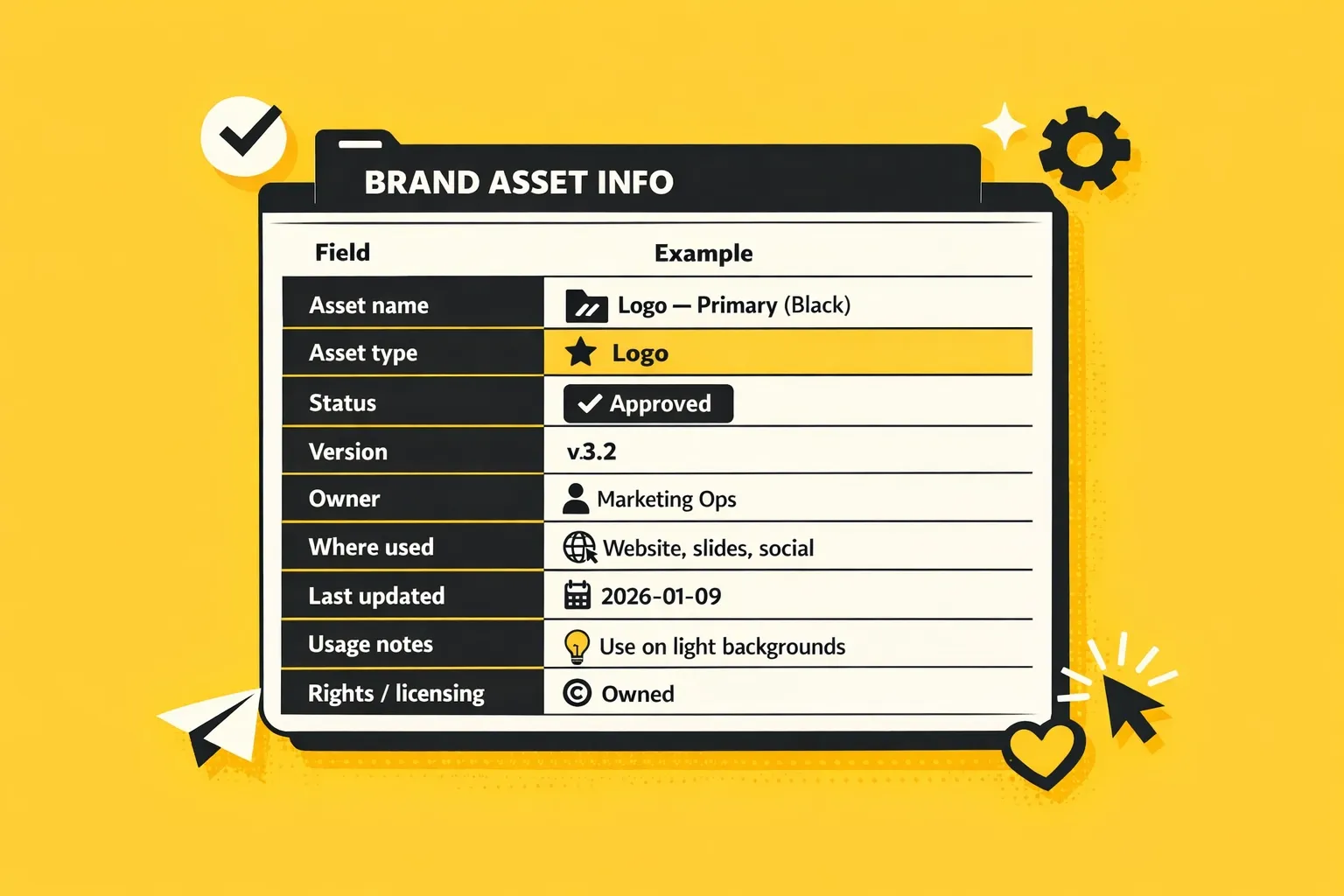
Small detail that helps a lot: if your team keeps using outdated files, add a field called “What to use instead” for anything retired. It reduces mistakes without extra meetings.
How to Manage Brand Assets
A brand asset system doesn’t have to feel bureaucratic. A good brand asset management workflow answers three questions fast:
What’s approved? What’s current? Where do I get it in under 30 seconds?
Here’s a simple workflow that works for most teams:
- Request / create
Someone creates or requests an asset (logo variant, template, messaging block).
- Review once, visibly
Add a clear approval step (even if it’s lightweight). The key is that approval is visible later.
- Publish the approved version as the default
Approved assets should be the easiest ones to find (not hidden in a “final” folder).
- Version control for updates
When the asset changes, update the file but keep the “official” link stable so teams don’t spread outdated copies.
- Retire old versions properly
Don’t leave retired assets next to current ones. Mark them Retired and add “Use instead.”
The goal is to make the right choice effortless. Here is a detailed guide.
Where to Store and Organize Brand Assets
A simple rule: anyone on your team should be able to find the latest approved logo or slide template in under 30 seconds.
You can get there with a basic structure and a few consistent labels. The exact folder names matter less than clarity. The real difference comes from making “approved + current” obvious and easy to access—especially for non-designers and external partners.
That’s exactly what a DAM like Pics.io is built for: it keeps your brand assets in one source of truth, makes them searchable with metadata, shows what’s current (and what’s outdated), and lets you share the approved version via a link instead of sending files back and forth.
Common Mistakes to Avoid
The most common brand-asset failure is ambiguous. When there are too many “official” variants, people guess. When approvals aren’t visible, people reuse what they already have. When external partners don’t have one reliable link, they’ll keep using whatever you sent them months ago.
If you fix only one thing, fix this: make the latest approved version effortless to access.
What this Looks Like in Real Life
Here’s a real-world example of how the “30-second rule” becomes achievable in Pics.io.
Case: Keyes Company (real estate, thousands of internal users)
Before Pics.io, Keyes had brand and marketing files spread across multiple tools and locations (Dropbox, Adobe, Google Drive, SharePoint, email). Finding the right asset became a daily tax: their team measured that people spent up to 13% of the day just finding or filing files. With 4,000 agents and 40,000+ assets, marketing often turned into “human search engines,” constantly locating and sending the same files over and over.
With Pics.io, Keyes built a self-serve library where “approved + current” is obvious:
- They curated approved images with clear licensing/ownership, so agents can safely use what’s in the library (instead of grabbing random images from the web).
- They used public collections + search so thousands of people can access the right assets without relying on a small marketing team.
- They relied on version control to keep links stable: update the file → the link stays the same, which prevents broken links and last-minute rework.
The result: Keyes reported a 73% reduction in time spent searching and retrieving assets for the marketing team compared to pre-launch.
Keyes compared time spent on “find/retrieve/send brand assets” for the marketing team before and after launch, using internal workflow tracking and a consistent set of common requests. The “73% reduction” reflects time saved on repeated asset searches and manual forwarding once the library became self-serve with clear “approved + current” versions.
Where the time and money savings come from: fewer interruptions to designers/marketing ops, fewer “wrong/outdated file” mistakes, fewer broken links, and lower risk of using assets without proper rights.
FAQs
What are brand assets?
Reusable brand elements that build recognition and keep your content consistent (logos, colors, typography, templates, messaging blocks, and style rules).
Are brand assets the same as brand identity?
Not exactly. Identity is the overall system and “feel.” Assets are the concrete pieces you use to express it.
Are brand assets always digital?
No. Many are digital, but they can also be physical (packaging) or audio (sound cues).
Where should brand assets live?
In a single source of truth that’s easy to search and share—especially with agencies and partners.
How often should we review brand assets?
Quarterly is enough for most teams. Review sooner if you rebrand, launch a new product line, or change positioning.
A Practical Next Step
If you want a quick win, start with an inventory and mark Approved vs Retired. That one change prevents most “wrong logo / wrong deck” issues.
And if your team is growing (more creators, more channels, more partners), consistency becomes much easier when the “right version” is the easiest version to grab.
Did you enjoy this article? Give Pics.io a try — or book a demo with us, and we'll be happy to answer any of your questions.
Author

Eugene is a product manager with hands-on experience across sales, logistics, and customer support in the DAM space. He holds a Master’s degree in International Economics and also works with frontend development and analytics. He brings a deep, practical understanding of how DAM is used day to day.


