

Published: 23 March 2023
Updated: 6 February 2026
In this article, you’ll learn:
On Monday, the campaign is approved. On Tuesday, a designer drops a “final” banner into the paid social folder. By Friday, the ads are live — and everything looks fine… until someone asks a simple question:
“Do we actually have the right to use this image in ads in the UK?”
And suddenly the team is doing the usual scavenger hunt: Slack threads, old email chains, a Drive folder called “contracts”, a PDF named “license_v3_updated”, and a vague memory that the asset came from an agency “somewhere around last spring”.
This is what license chaos looks like in real life. When a license is separate from the asset, it’s easy to publish with the wrong terms: the wrong region, the wrong channel, expired dates, missing model release, or incorrect attribution.
DAM license management solves this by making usage rights part of the asset itself: the rules (where/when/how it can be used) are visible, searchable, and tied to the file — along with the proof document. So when someone grabs an image for a landing page, a brochure, or paid ads, they don’t have to guess.
What to Track for Every Licensed Asset
| Field | Example | Why it matters |
|---|---|---|
| Licensor / Source | Getty / Agency X / Influencer @name | You know where the rights come from and who to contact for confirmation. |
| Allowed use | Commercial, paid ads allowed | Separates “okay to post” from “okay to advertise.” |
| Channels | Website, Meta Ads, Email, Print | What’s fine for a website isn’t always allowed for paid, OOH, or TV. |
| Territory | US + Canada only | A common reason you can’t run a campaign globally. |
| Term / Expiration | Start: 2026-02-01, End: 2026-08-01 | Prevents licenses from expiring silently. |
| Exclusivity | Exclusive for retail category, 3 months | Affects campaigns and helps avoid partner conflicts. |
| Required attribution | “Photo: John Doe” | Ensures the correct credit is used wherever the asset appears. |
| Releases (people/property) | Model release attached | Without releases, you may not be allowed to use people/property in ads. |
| Proof link | Contract PDF / invoice / email approval | Keeps proof one click away instead of buried in inboxes and folders. |
| Status / Risk | OK / Needs review / Restricted | Makes it instantly clear what’s safe to use right now. |
Result: teams stop guessing, expired licenses don’t slip into campaigns, and proof is always one click away.
Common License Types You’ll Likely Manage in a DAM
Most teams hear “license” and think stock photos. In reality, rights show up across almost every content stream. Here are the common types worth tracking in your DAM (with the “gotcha” each one brings).
- Stock photos and videos. Often limited by term, territory, and usage type (commercial vs editorial). “Web use” doesn’t automatically mean “paid ads allowed.”
- UGC permissions (customers/community). Even if content is “public,” you may still need explicit permission (and sometimes a defined usage period) to use it in ads or on product pages.
- Influencer/creator content. Usually tied to specific channels, campaign dates, and exclusivity clauses. Also common: required attribution and “no paid amplification” unless stated.
- Model releases (people in photos/videos). Not a “license” in the classic sense, but a critical document. Without a release, using the asset in commercial/promotional contexts can be risky.
- Property releases (locations, artworks, trademarks). Stores, private locations, murals, branded objects, and recognizable packaging can require separate permission for commercial use.
- Agency or contractor-produced assets. The big question: who owns what. Contracts may limit reuse across brands/regions or require extra fees for extended usage.
- Music and audio licenses (videos, podcasts, reels). Common limits: platform restrictions, monetization rules, territory, and terms. “Licensed for web” may exclude YouTube ads, TV, or in-store playback.
- Fonts, templates, and design elements. Teams forget these are licensed too. Font licenses can restrict the number of seats, embedding, or commercial distribution (e.g., templates shared externally).
- Brand partnerships and co-marketing assets. Often have strict approval requirements, channel limitations, and end dates. Also common: “use only with approved messaging” clauses.
- Third-party product imagery (retailers, distributors, manufacturers). You may be allowed to use assets for product listings but not for paid campaigns, hero banners, or out-of-category placements.
A Simple 6-step Workflow for DAM License Management
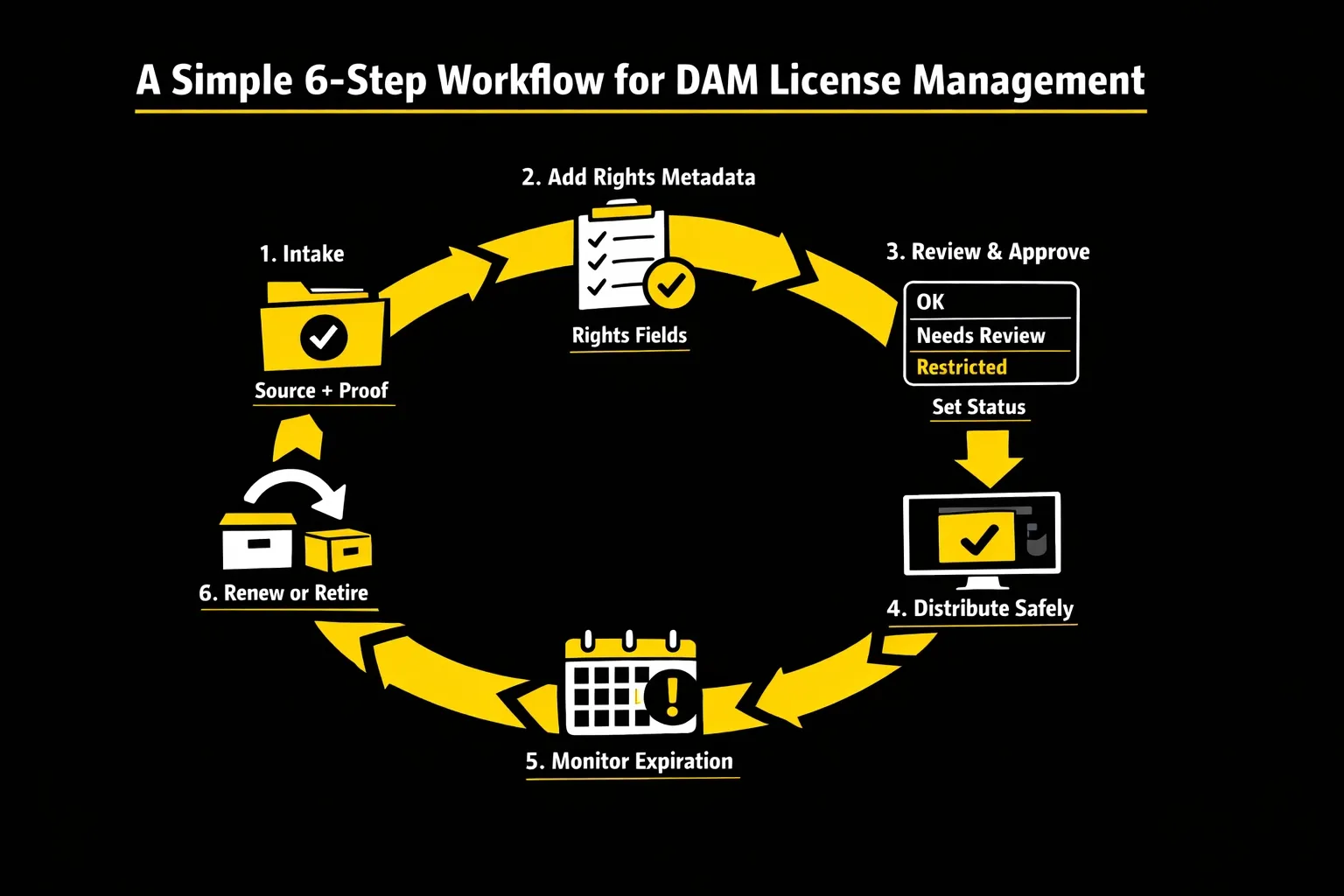
1) Intake: capture the “source of truth” early
When an asset enters your library (from stock, an agency, a creator, or a partner), capture two things right away:
- where it came from (licensor/source);
- what proof exists (contract, invoice, email approval, release form).
If the proof isn’t available yet, mark the asset as "Needs review" so it doesn’t get used by accident.
2) Add rights metadata (the minimum set)
Fill the license fields your team actually uses in production: allowed use, channels, territory, term/expiration, attribution, releases, and any “do not use for…” notes.
Keep it consistent: dropdowns/controlled values beat free-text when you want reliable filtering later.
3) Review & approve (make it a visible status, not a feeling)
Create a simple rights status like:
- OK to use;
- Needs review;
- Restricted/ Do not use;
- Expired.
Legal doesn’t have to review every file—but your DAM should clearly indicate when review is required (especially for influencer/UGC, people/property, and partnership content).
4) Distribute safely (share the approved version + context)
When teams or agencies pull assets, they should get:
- the correct, approved file;
- the usage context (rights fields + attribution);
- access that matches their role/region.
This is where portals/shared links/collections help: you’re sharing what’s safe to use.
5) Monitor expiration (don’t let licenses die silently)
Set up a routine (or automation) around end dates:
- upcoming expirations get flagged;
- owners get notified;
- assets move into a Restricted/Expired state when the term ends.
This prevents the classic “we didn’t notice until the campaign was already live” moment.
6) Renew, replace, or retire (close the loop)
When something expires, you need a clear action:
- renew (update term + attach new proof);
- replace (swap the creative in campaigns/pages);
- retire (restrict access, remove from approved packs, archive).
The key is consistency: expired assets shouldn’t remain discoverable as “ready to use.”
DAM Features That Make License Management Workable
License management fails for one boring reason: the rules live far away from the asset. The moment someone has to leave their DAM to figure out “can we use this in paid ads in the UK?”, they’ll guess, copy an old file, or ship anyway and hope nobody asks.
A DAM helps when it does two things at once: it keeps the proof attached, and it makes the rules readable at a glance.
Start with rights metadata. When a marketer searches the library, they should be able to narrow results down to paid social allowed + US/UK + valid this quarter in seconds. That only works if you use consistent values (dropdowns/controlled vocab) instead of everyone typing their own version of “Meta ads/ FB ads/ Paid/ Social ads.”
The next piece is a visible rights status. Most teams don’t need Legal to review every asset, but they do need a clear signal to prevent accidental use. A status like OK to use/ Needs review/ Restricted/ Expired turns rights from “tribal knowledge” into a decision anyone can follow. It also makes your workflow lighter: you’re not policing everything, you’re just watching the “Needs review” queue.
Proof is what saves you when someone asks for receipts. That proof can be a contract PDF, an invoice, a model release, or an email that grants permission. When proof is in another system, a simple “Proof link” field plus an attached reference (like an external link) is often enough to keep everything connected.
Then comes the thing teams underestimate: expiration. Licenses break quietly six months later when the end date has passed, and the asset is still sitting in your “Approved” folder. If your DAM can help you surface “expiring soon” assets and you build a habit around reviewing them, you avoid the most common rights mistakes without turning this into a legal project.
Finally, distribution needs guardrails. The problem usually isn’t that people can’t find files — it’s that they can find too many, including drafts, outdated exports, and assets that shouldn’t be reused outside a specific campaign or region. Role-based access, curated portals, and share links are how you make “approved for use” the default path, especially when agencies and regional teams are involved.
How to Set it Up in Pics.io
In Pics.io, start by creating a small “Rights” metadata set and commit to using it consistently. Your goal is simple: every asset that might ship externally should carry a handful of fields that answer “where, how, and when.”
Keep the field set minimal at first. The moment you add 25 fields, the team stops filling them. A practical starter set is:
- Rights status (OK to use/ Needs review/ Restricted/ Expired);
- Allowed use (Commercial/ Editorial/ Internal only);
- Channels (Website, Paid Social, Email, Print, etc.);
- Territory;
- Start date/ End date;
- Attribution;
- Licensor/ Source;
- Proof link (contract/ release/ approval).
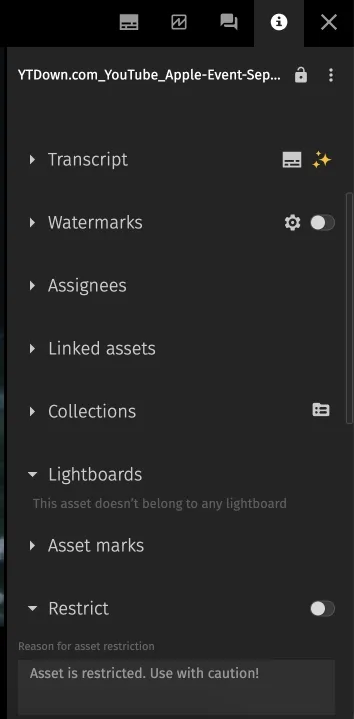
Now decide where proof lives. Some teams store everything in the same storage as the assets. Others keep contracts in Drive, approvals in email, and releases in a signing tool. Either is fine — what matters is that your DAM has a single canonical pointer so proof is always one click away. If you’re using external sources, this is exactly where External Links become useful: the asset stays in the DAM, and the license proof stays connected.
Next, make the library behave safely by default. The simplest pattern is to separate “working” from “approved.” That can be as basic as two collections: one that represents what’s safe to use, and one that’s waiting for review or missing proof. When someone is under deadline pressure, you want them naturally pulling from “Approved,” not browsing raw intake.
Then set up saved searches that act like your control panel. You need just the ones that prevent mistakes:
- assets with needs review;
- assets expiring in the next 30–60 days;
- assets missing Proof link or End date.
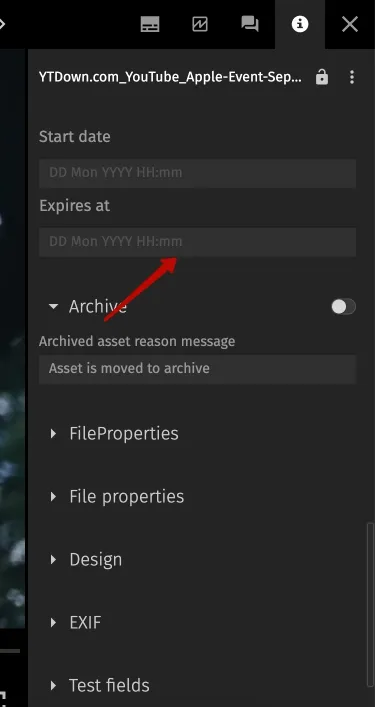
Those searches become your maintenance loop. A quick weekly check is usually enough to prevent silent expirations from leaking into campaigns.
Last, lock down distribution paths. If agencies or regional teams need assets, don’t give them the whole library and hope they choose the right file. Share a curated pack/collection that already reflects the right decision. That’s how you keep governance friendly: you’re not saying “don’t do this,” you’re giving people a clean, safe default.
Governance: Who Owns Usage Rights in Your DAM
License management breaks when it’s “everyone’s responsibility,” because then it’s nobody’s job. The fastest way to keep rights clean isn’t a strict policy — it’s clear ownership and a simple path people can follow when they’re in a rush.
Think of governance as a lightweight contract between teams: creators capture the source and proof early, a small group reviews only the risky cases, and everyone else distributes assets only from “approved” spaces.
Here’s the smallest role split that works without slowing anyone down:
- DAM Owner (Marketing Ops/ Library Admin): defines the rights fields, keeps statuses consistent, runs the “expiring soon” checks, and makes sure approved packs stay clean.
- Creators (Design/ Content/ Agencies): attach the source and proof link at intake, and flag anything unclear as Needs review instead of guessing.
- Reviewer (Legal/ Brand): reviews only what lands in Needs review (or high-risk categories like influencer/UGC, people/property, partnerships), then sets the status to OK to use or Restricted.
- Publishers (Performance/ Regional/ Web): pull assets only from approved packs/collections and follow the license fields for channel, territory, and attribution.
External partners deserve one special rule: don’t give them the whole library and ask them to “be careful.” Share curated packs or portals that already reflect the right decision. That way, agencies and regional teams can move fast without accidentally picking a restricted asset.
Expiration is the other place where governance matters. When a license ends, the workflow should be boring and predictable: the asset status flips to Expired/Restricted, it disappears from approved packs, and the owner decides whether to renew, replace, or retire it. If that loop exists, rights don’t “silently rot” in your library — and your campaigns don’t get surprised later.
Conclusion
License management in a DAM is simply a way to keep usage rules and proof attached to the asset, so teams don’t guess under deadline pressure. Once you standardize a small set of rights fields, use a clear status like OK to use/ Needs review/ Restricted/ Expired, and build a habit around upcoming expirations, most “rights mistakes” disappear on their own.
The biggest win is speed with confidence: marketers can launch faster, regional teams can reuse content safely, and Legal gets fewer last-minute proof requests because everything is already connected and searchable.
FAQ
What’s the difference between license management and rights management?
License management is about the agreement itself: who granted rights, for what use, and for how long — plus the proof. Rights management is the operational side: how those rules are stored, surfaced, and enforced in daily work so people don’t misuse an asset.
Which metadata fields are the minimum to track?
If you track only a few, make them the ones that prevent misuse: rights status, allowed use, channels, territory, end date, attribution, source/licensor, and a proof link. Everything else is optional and can be added later.
Where should we store license proof — inside the DAM or externally?
Either works. The critical requirement is that the proof is reliably connected to the asset record. If proof lives elsewhere (Drive, signing tools, email), store a single canonical link in the DAM and keep it consistent.
How do we prevent expired assets from being used?
Treat expiration like a status change, not a reminder. When the end date passes, the asset should move to an Expired/Restricted state and be removed from approved packs. Then you decide to renew, replace, or retire.
How do we handle agencies and regional teams without losing control?
Share curated, approved packs instead of giving broad library access. Make “approved assets” the default distribution path, and keep working folders for production only.
Did you enjoy this article? Give Pics.io a try — or book a demo with us, and we'll be happy to answer any of your questions.
Author

Akinai is a customer support leader with experience managing teams of 5+ people. She holds a Bachelor’s in International Business and UX/UI training, including a second-place finish at RadCode. In leadership meetings with executives and stakeholders, she consistently champions the customer’s voice.


