

Published: 2 November 2023
Updated: 25 February 2026
In this article, you’ll learn:
A campaign ships, files fly around, edits happen in parallel — and a week later nobody knows:
Which version is approved? Where’s the source? Can we use this in ads? Is it still on-brand?
The usual answer is “add tags.” And sure — metadata matters. But manual tagging doesn’t scale. It takes time, it’s easy to skip, and the library slowly turns into duplicates, half-approved drafts, and “final_final” exports you can’t trust.
What counts as a “brand asset”
A brand asset is any file (or template) your team reuses to communicate your brand — and that needs to stay consistent, approved, and easy to find.
The key test is simple:
Common examples of brand assets
- Brand kit basics: logos (all formats), icons, fonts, color tokens, patterns
- Brand guidelines: rules + do/don’t examples, tone-of-voice snippets, usage notes
- Templates: social templates, ad templates, presentation/master slide decks, email modules
- Campaign creatives: banners, paid ads variants, landing visuals, hero images
- Social media packs: post/story/reel covers, thumbnails, captions/copy blocks (if you store them)
- Product content: packshots, lifestyle images, PDP galleries, feature callouts
- Video deliverables: final cuts, cutdowns, subtitles, thumbnails, motion templates
- Sales & partner materials: one-pagers, case study PDFs, pitch deck slides, partner toolkits
- Press & community: press kit, approved founder/team photos, boilerplate blurbs
What usually isn’t a brand asset
- Random drafts and personal exports with no owner or status
- One-off working files that won’t be reused
- Internal docs that change daily (unless you manage them as controlled templates)
A healthy library separates source files, approved outputs, and archived/expired assets — so search results stay trustworthy, and nobody accidentally ships an old version.
The asset lifecycle
A brand asset has a real life. It usually starts as a brief (someone needs a banner, a deck, a product image set). Then it becomes a draft. Then it goes through reviews and changes.
Eventually, it gets approved, shared with the people who need it, used in the wild… and then updated again when the campaign shifts, the product changes, or the brand rules evolve.
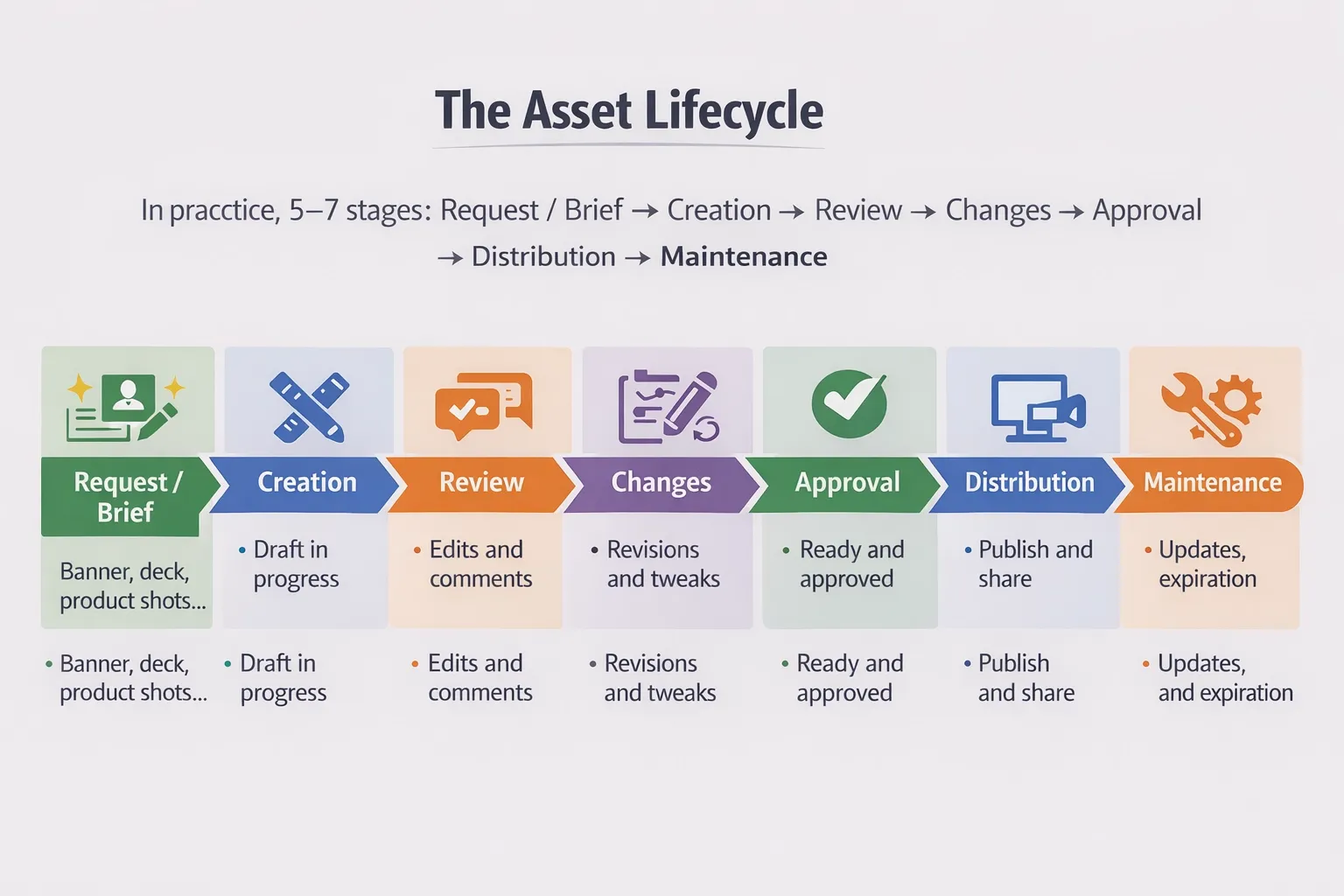
The exact names don’t matter. What matters is that every stage creates context you’ll need later: who made it, what it’s for, which version is safe, what “approved” means, and where it’s allowed to be used.
This is where things break without a system. The brief sits in a Slack thread. The draft lives in someone’s Drive. Feedback is split between comments, DMs, and screenshots. Someone exports a “final” and sends it to a partner. Then, a week later, someone asks the classic question: “Which one did we ship?” or “Who approved this?” And because the context is scattered, the only way to answer is through detective work.
Most teams try to fix the chaos with tagging. They’re not wrong — metadata is what makes assets searchable and reusable. But manual tagging is also a time sink. When people are rushing, nobody wants to spend 10 extra minutes adding fields and tags to every upload, so it gets skipped or done inconsistently. That’s how libraries end up looking organized on paper, but failing in real life when you actually need to find the right thing fast.
The scalable approach is simple: don’t treat metadata, versions, and approvals as separate tasks. They should live with the asset and grow naturally as the asset moves through the lifecycle. The version history should show what changed and why. Approval should be a visible status, not a message lost in chat. And the metadata should be lightweight but reliable enough to make the asset discoverable and safe to reuse without turning your team into full-time librarians.
Before you create: standards that prevent rework
Most rework happens because the team never agreed on the basics up front. When standards live only in people’s heads, every asset becomes a one-off decision: which size, which format, which color profile, which logo lockup, which disclaimer, which “final” folder. That’s how you lose hours to tiny fixes that should’ve been automatic.
Start with a lightweight asset spec checklist. Think of it as “export rules that save you from ping-pong.” What formats do you ship for each channel, what sizes matter, what’s the maximum file weight, which color profile is expected, and which export presets your team uses so outputs are consistent?
Add naming and a default folder/collection destination while you’re at it—because if people have to decide every time, they’ll decide differently every time.
Then add a brand compliance checklist that’s easy to apply during review. This isn’t a 40-page brand book; it’s the fast stuff that prevents mistakes: typography rules, logo clear space, background/contrast do’s and don’ts, tone-of-voice guardrails for captions, and the few legal notes that always come up (licensing, disclosures, usage restrictions). The goal is not “perfect design.” The goal is “no preventable brand mistakes make it to production.”
Finally, go “reusable first.” Every team needs a clear separation between the source of truth and the things you distribute. Master files (Figma/PSD/AI/AE projects) should be treated as controlled assets with owners and version history. Exports (PNG/JPG/PDF/MP4) are what you share with channels, partners, and stakeholders. When those two get mixed, people start editing exports, re-uploading random copies, and the library becomes impossible to trust.
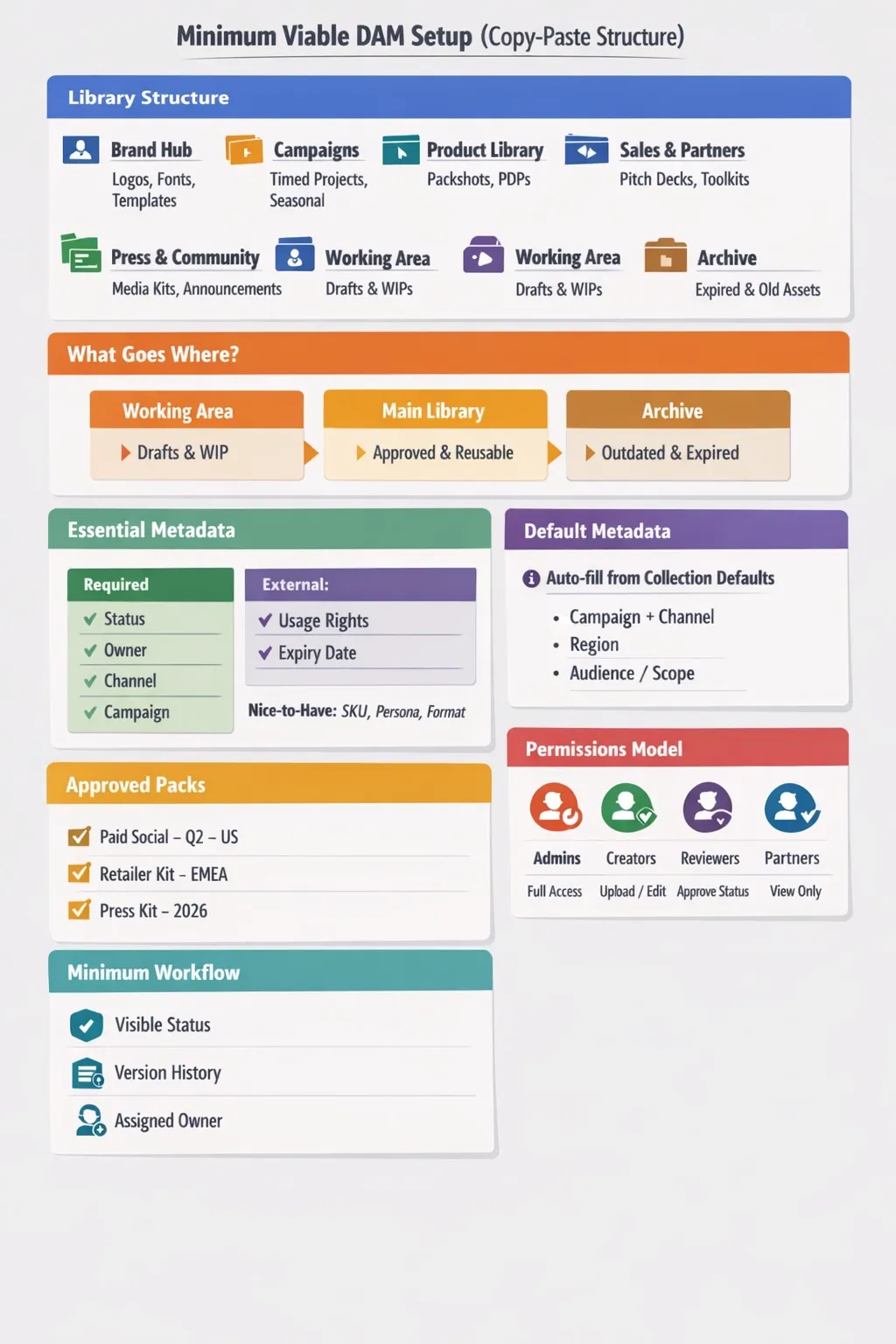
Minimum viable DAM setup
You need a setup that makes two things true: people can find the right approved asset fast, and assets stay safe to reuse without detective work.
How to create assets in a team
If you want a library that stays usable, you need two things: predictable naming and predictable versioning.
It instantly answers the questions people always ask later: what this is for, where it goes, what language it is in, and which iteration it is. The point isn’t strict policing — it’s giving everyone a default they can follow under deadline pressure.
Then define versioning rules that match how you work. A “new version” should mean the same asset evolved (new copy, new layout, updated product shot). A “variation” is typically the same concept adapted for a different placement, size, or language. A “new asset” is a different creative direction or a different deliverable entirely. When teams don’t define this, they either create endless duplicates or they overwrite important history, and both kill reuse.
Parallel edits are where even organized teams fall apart. The practical fix is to assign an owner for the asset (one person responsible for the “mainline” version), and treat other work as clearly labeled variants until it’s merged into the primary. You don’t need fancy branching jargon. You need a rule that prevents three people from producing three “finals” with no clear winner.
And don’t skip comments. Context is what turns a file into something reusable. A short note like “updated logo lockup,” “approved for Paid Social only,” or “swap hero image for Q2 launch” saves you from having to rewatch the entire history. This is also a way to reduce the tagging burden: when notes are captured during work, you don’t have to do “metadata cleanup day” later.
Approvals that actually work
Approvals fail when they’re vague. “Looks good” in Slack is not an approval system. It doesn’t tell you what was approved, for what use, by whom, and whether it’s still valid.
The simplest workflow that works is a clear status chain: Draft → Needs review → Changes requested → Approved. It makes the asset’s state visible without anyone having to ask in chat.
Pair that with roles so review doesn’t become a group exercise: the creator owns the draft, a reviewer checks quality and brand fit, and an approver gives the final “this can ship” decision.
To keep approvals from becoming a bottleneck, add a basic SLA. Even a soft rule like “review within 24–48 hours” changes behavior, because it sets expectations and reduces the endless “any updates?” pings. If you work in fast cycles, you can also define “auto-approve if no feedback in X hours” for low-risk assets — but only if your brand/legal context allows it.
Finally, define what “approved” means in your world. In marketing, it might mean “ready to publish on these channels.” In e-commerce, it could mean “meets PDP standards and matches the product spec.” In legal-heavy industries, it may mean “cleared for paid use until a specific expiry date.” The definition matters because it determines what metadata you must capture during approval (usage rights, region, channel, expiration). Otherwise, you’ll be back to manual tagging later, trying to reconstruct decisions from memory.
Governance: who owns what
A DAM only stays clean when “ownership” is real. If everyone can upload anything anywhere, you’ll get a polite mess: duplicates, orphaned drafts, inconsistent tags, and expired assets that keep resurfacing in search. Governance doesn’t have to be heavy — it just has to be clear enough that the library can run on default behavior, not heroic effort.
A simple responsibility matrix is usually enough. One person (or a small group) owns the system: they define the structure, create the default metadata fields, and decide what “approved” means. Creators own the assets they produce: they keep versions tidy, add the minimum metadata, and leave notes that explain changes. Reviewers and approvers own quality: they don’t just say “LGTM”; they set the status and confirm the usage rules. And someone has to own hygiene: archiving old work, retiring outdated logos, and ensuring the “source of truth” isn’t overwritten by random exports.
This is also where tagging becomes realistic. Instead of expecting perfect manual tagging from everyone, decide what metadata is mandatory and who is responsible for it. For example, creators can reliably fill “campaign/channel/language/owner,” while rights fields or expiry dates might belong to a brand/marketing ops role. The goal is to stop treating metadata as a single massive chore and turn it into a few small responsibilities attached to the workflow.
You’ll also want clear boundaries: what goes in, and what stays out. A DAM isn’t a dumping ground for every draft, screenshot, or personal export. A good rule of thumb is: if it’s meant to be reused, distributed, or referenced later, it belongs. If it’s a temporary working file with no long-term value, it should live in a working space, not in the “approved” library. Those rules protect search quality — and reduce the pressure to tag everything under the sun.
Finally, set a review cadence so the library doesn’t decay quietly. A monthly cleanup can be as simple as “archive finished campaigns, remove obvious duplicates, check missing owners.” Then do a quarterly audit for the bigger stuff: outdated brand elements, permissions, rights/expiry fields, and whether your structure still matches how teams actually work. When this cadence exists, governance stops feeling like bureaucracy and starts feeling like maintenance — like keeping a product healthy.
Distribution & portals: sharing without losing control
Sharing is where many teams lose control. The moment assets leave the building — to agencies, partners, local teams, franchisees, resellers — the risk spikes: wrong versions are used, files are re-uploaded without context, and approvals are separated from the asset itself.
A brand portal (or partner-facing collections) fixes that by giving external people a clean, curated space. Instead of sending zip files and hoping for the best, you share a controlled library view: only what’s approved, only what they’re allowed to access, with the context they need to use it correctly. This also reduces tagging pain, because you’re not trying to make “everything searchable for everyone.” You’re making specific packs easy to find for specific audiences.
Share links should behave like permissions, not like “public forever.” Time limits, access rules, and download controls help you share confidently without losing governance. If an agency needs the Paid Social pack for Q2, they should get exactly that — not your entire campaign archive, and definitely not drafts.
“Approved packs” are especially useful when you have regions, channels, or product lines. A regional team shouldn’t have to guess which logo variant or disclaimer applies. Give them a ready-to-use pack that matches their market and channel rules, and keep it updated in one place. When something changes, you update the pack — and everyone stays aligned without endless resend loops.
Conclusion
Creating brand assets is the easy part. Keeping them findable, approved, and safe to reuse is where most teams lose time.
A DAM helps when it’s more than “a place to store files.” The winning setup is a simple lifecycle: brief → draft → review → approved → distributed → updated — where versions, approvals, and lightweight metadata live with the asset. That’s how you avoid “final_final,” reduce rework, and stop wasting hours on manual tagging that nobody has time for.
If you take only one thing from this guide, make it this: don’t try to fix chaos with stricter folders or a heroic tagging push. Fix it with clear standards, a minimal approval workflow, and governance rules that keep the library clean over time.
FAQ
How do we reduce time spent on manual tagging?
Don’t aim for perfect tagging. Define a small set of required fields (e.g., campaign, channel, language, owner, status) and assign ownership of the rest (e.g., rights/expiry). Capture context via notes and approvals as work happens, so you don’t have to clean up later.
What should we store as the “source of truth”: master files or exports?
Both, but in different places/roles. Master files (Figma/PSD/AI/AE) are your source of truth for editing and need controlled versioning. Exports (PNG/JPG/PDF/MP4) are what you distribute. Mixing them is how teams end up editing the wrong thing and duplicating work.
How should we handle parallel edits without creating a mess?
Assign an owner to the “main” asset, and keep other work as clearly labeled variants until one is merged into the primary. The goal is to avoid multiple competing “finals” with no clear approved winner.
How do we share assets with agencies and partners without losing control?
Use curated collections or a brand portal, and share links with permission rules (access scope, expiration, download controls). Give partners “approved packs” by region/channel so they don’t guess.
How often should we clean up the library?
A light monthly cleanup (archive finished campaigns, remove duplicates, fill missing owners) plus a quarterly audit (permissions, rights/expiry, outdated brand elements) usually keeps things healthy without turning governance into a full-time job.
Did you enjoy this article? Give Pics.io a try — or book a demo with us, and we'll be happy to answer any of your questions.
Author

Fidan is a results-driven Sales Manager with a strong track record in SaaS, B2B, and enterprise sales. She combines Agile ways of working with strong analytical skills, and has closed 80+ business and enterprise deals, driving $150K in revenue.


