

Published: 26 May 2022
Updated: 20 February 2026
In this article, you’ll learn:
Production Asset Management (PAM) is the part of asset management that focuses on the messy middle of content creation: reviews, different versions, approvals, and handoffs across your production workflow. It’s what keeps your team from shipping the wrong “final” file, losing context in endless comment threads, or redoing work because someone edited an outdated export of the same asset.
Important: Here, PAM means Production Asset Management — approvals and version control for marketing and creative teams working with media assets and multimedia files.
Not to be confused with manufacturing/enterprise asset management, which focuses on equipment reliability and maintenance (history, preventive/predictive maintenance, downtime, spare parts, ERP, and compliance).
If your digital assets move through multiple people (designers, marketers, legal, regional teams, agencies), you need a system that makes production workflows traceable: what changed, who approved it, and which version is safe to publish and distribute.
In this guide, we’ll break down what PAM is, and how it differs from digital asset management and media asset management.
PAM vs DAM vs MAM: what’s the difference?
They overlap, but the focus is different:
- PAM (Production Asset Management) is about creating and approving assets: versions, review cycles, feedback, and “what’s the approved one?” It’s built for the production stage — where teams create, iterate, and align on quality.
- DAM (Digital Asset Management) is about organizing, finding, governing, and distributing approved assets: metadata, search, rights, portals, sharing, and better management of files and services across the business.
- MAM (Media Asset Management) is about rich media production workflows (especially video/audio): ingest, proxies, timecode-based review, editorial pipelines, and broadcast/post-production needs for large media files.
Quick comparison
| System | Best for | Core focus | Outcome |
|---|---|---|---|
| PAM | Creative production workflows | Versions + review + approvals | Faster approvals, fewer reworks, less chaos |
| DAM | Company-wide asset library | Search + metadata + rights + distribution | Assets are easy to find and safe to reuse |
| MAM | Video/audio-heavy teams | Media pipelines + proxies + timecodes | Smooth post-production and editorial control |
Which one do you need?
- Choose PAM if your pain is approval chaos: parallel edits, constant revisions, “which file is final?”, approvals scattered across Slack/Email, and manual handoffs slowing production.
- Choose a DAM if your main pain is asset discovery and reuse: the files exist, but it’s hard to quickly find the right digital asset, understand context, manage metadata, share assets safely, and support distribution across teams and organizations.
- Choose MAM if you run video-first production with editorial pipelines, heavy formats, and broadcast/post-production requirements for media assets and multimedia files.
In practice, many teams use a DAM as the “single source of truth” and add strong PAM workflows (versions + approvals) to control what becomes publish-ready. That way, storage stays clean, and production stays traceable across the entire lifecycle of a campaign asset — from creation to distribution.
What is Production Asset Management (PAM)?
Production Asset Management (PAM) is a system for managing assets as they’re being created. It keeps every revision, comment, and approval tied to the right file, so teams can move from draft to final without losing context or shipping the wrong version.
Think of PAM as the workflow layer that answers:
- What’s the latest version?
- What changed and why?
- Who approved this?
- Which file is safe to publish, share, or send to partners?
What “production” means here
In this context, “production” is the full path an asset takes before it becomes publish-ready:
- Review: stakeholders leave feedback where it belongs (on the asset), not scattered across email/Slack threads.
- Versions: every update becomes a tracked revision, so you can compare changes and roll back if needed.
- Approvals: assets move through clear statuses (e.g., Draft → In review → Approved) with an audit trail.
- Delivery: you share assets via controlled links/portals, with the right permissions, usage rules, and metadata attached.
The goal is simple: production stays traceable, and “final” actually means final.
When PAM is not what you need (common edge cases)
PAM isn’t always the best first step. You may not need PAM if:
- You only have one creator and no real approval chain. If assets rarely go through reviews, versioning won’t pay off.
- Your main problem is search and reuse, not production. If the pain is “we can’t find anything” and “we don’t know what’s approved,” you likely need a DAM-first setup with strong metadata, governance, and better management.
- You’re a video/broadcast-heavy team with editorial pipelines. If you need proxy workflows, timecode-heavy collaboration, and post-production tooling, a specialized MAM solution (or stack) may be a better fit.
- Your bottleneck is project management, not assets. If the chaos is tasks, deadlines, and ownership (not versions/approvals), fix the PM layer first — or integrate it tightly with your asset system.
- You’re actually solving manufacturing asset management problems (equipment maintenance). In that world, the focus is tracking physical assets across the entire lifecycle: maintenance history, preventive maintenance, predictive maintenance, real-time data from the shop floor, reducing unplanned downtime, unexpected failures, reliability, spare parts planning, inventory management, ERP integration, and cost savings from reducing costs and maintenance costs. That’s a different category of enterprise asset management.
In most marketing and creative teams, the sweet spot is: DAM as the source of truth and PAM workflows to control drafts, reviews, and approvals.
Who needs PAM (and how to tell fast)
If your workflow still runs on shared folders, it usually “works” right up until the moment you scale — more stakeholders, more parallel edits, more channels, more reuse. PAM starts paying off when production becomes a process rather than a one-off task.
Here are the few signals that matter most:
- People regularly ask “which one is final?” (and the answer changes depending on who you ask).
- Feedback lives in too many places: Slack, email, Figma comments, screenshots, and random docs.
- Multiple people edit in parallel, and you lose track of what merged into what.
- Approvals are implicit (“looks good”) instead of tracked (“Approved by X on Y”).
- You ship the wrong file at least once in a while (e.g., an old logo, a wrong crop, outdated pricing, or a missing disclaimer).
- External partners are involved, and access becomes risky or messy.
- Reuse is painful because context is missing: you can’t quickly tell what’s safe to repurpose.
If two or three of these are happening weekly, you don’t have a discipline problem. You have a workflow problem — and that’s exactly what PAM is built for.
Teams that benefit most
PAM is most useful for teams that produce many variations and need decisions to be traceable.
Marketing teams feel it when campaigns require multiple formats and last-minute approvals. Creative ops teams feel it when they’re coordinating handoffs across designers, brand, legal, and regional stakeholders. E-commerce teams hit the wall when product content changes constantly — packshots, lifestyle images, PDP updates, marketplaces, retail partners — and teams need to track assets, share assets safely, and keep metadata consistent. Agencies and in-house studios benefit because they live in version cycles by default, and “approved” needs to be crystal clear to avoid rework and client back-and-forth.
In short, if your team creates assets for multiple channels and stakeholders, PAM helps production move faster without turning into chaos.
Typical workflows: PAM fixes
PAM shines in workflows where “one asset” actually means “many assets over time.”
Campaigns are a classic example: one concept turns into paid social variants, landing page visuals, email headers, regional versions, and multiple rounds of feedback. PAM keeps revisions and approvals attached to each deliverable, so you don’t lose the thread across creation and distribution.
Product content is another big one. New photography comes in, retouching happens, someone requests a different mobile crop, legal asks for a disclaimer, marketplaces need specific specs, and suddenly there are five “finals.” PAM makes it obvious which version is approved for which use.
Brand updates (logo refresh, new typography, updated guidelines) tend to break folder-based systems because old and new files coexist for months. PAM helps you roll out changes safely, track what was replaced, and keep the approved set clean.
And during seasonal drops (holidays, promos, launches), timelines compress, and approval speed matters more than ever. PAM reduces the “where is it / who approved it” loop so your team can ship on time with fewer mistakes.
PAM, DAM, and MAM: How they can work together
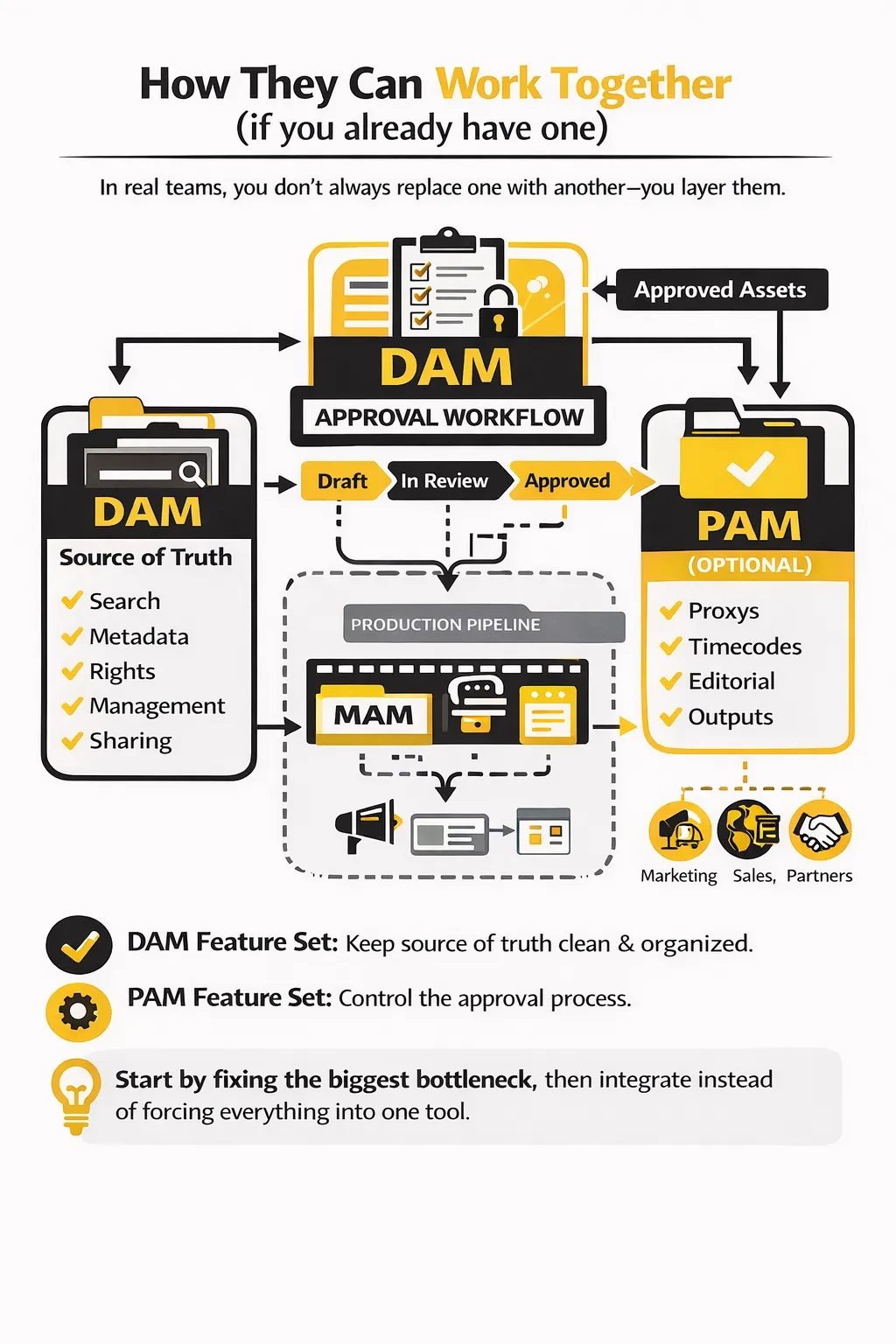
Now that the differences are clear, let’s talk about how these systems often work together in real teams.
In real teams, you don’t always replace one with another — you layer them.
A common setup is DAM as the source of truth (search, metadata, rights, sharing), with PAM workflows on top to control how drafts become approved and publish-ready assets. That means your library stays clean while production stays traceable — with automation where it helps (for example, automating workflows like routing approvals, notifying stakeholders, or generating status-based share links).
If you’re video-heavy, MAM often handles the production pipeline (proxies, timecodes, editorial). At the same time, a DAM becomes the place where approved outputs live for broader reuse — marketing, sales, partners, and localization teams.
So the best choice is usually the one that fixes your bottleneck first — then integrates with the rest, instead of forcing everything into one tool.
How to choose a PAM system
Before you jump into demos, make sure the tool covers the core PAM basics: version history, version-aware feedback, approval statuses with audit trail, safe external sharing, and production-friendly search.
These questions quickly reveal whether the software can handle real production chaos (parallel edits, approvals, external partners) or if it’s just “storage with comments”:
- How does versioning work in practice? Can every update be saved as a new revision with a clear history (who/when/what changed)?
- Can we compare two versions side by side? (visual diff, previous/next, restore)
- How do approvals work? Are there statuses, “approved by” records, and an audit trail — not just “likes” or comments?
- Can feedback be tied to a specific version? So comments don’t get applied to the wrong revision later.
- How does it handle parallel edits? What happens when two people update the same asset (or two versions are being reviewed at once)?
- Can we share work-in-progress safely with external partners? With expiring links, limited permissions, and control over downloads.
- Can we separate “approved for use” from “approved for a specific channel”? (e.g., approved for web, not for paid ads; region-specific approvals)
- How does search work during production? Can you find by project/campaign, status, owner, and version notes — not only by file name?
- What does the integration story look like? Storage (Drive/S3), Adobe, project tools — plus how updates are synced and tracked.
- What reporting do we get? Can you generate reports and measure cycle time (draft → approved), bottlenecks, and rework drivers?
If a vendor can demo these without hand-waving, you’re looking at a system built for production — not just a library.
Red flags and what to avoid
You don’t need a “perfect” solution, but there are a few warning signs that usually turn into pain later:
- Versioning is manual (“upload a new file and rename it”), or revisions don’t have clear authorship and timestamps.
- Approvals are informal (no statuses, no audit trail, no “approved version” concept).
- Comments aren’t version-aware, so feedback drifts and gets applied to the wrong iteration.
- External sharing is risky (no expiration, no granular permissions, no control over download).
- The tool forces a single workflow on everyone, rather than letting you adapt stages to your process.
- Search depends on perfect metadata, with no way to quickly filter by status, project, or recent activity.
Security & permissions basics (must-haves)
In PAM, security isn’t a separate topic — it’s part of how production stays safe and scalable.
At minimum, look for role-based access (who can view, comment, approve, download, and edit), as well as the ability to limit access by team, project, or collection. You also want to share links with controls — expiration, password (if needed), download restrictions, and the ability to revoke access instantly.
Finally, make sure there’s a reliable audit trail and integration with your wider stack. When something goes wrong (and eventually it will), this is what saves you from guesswork and protects quality and business value.
How to implement PAM in 7 steps
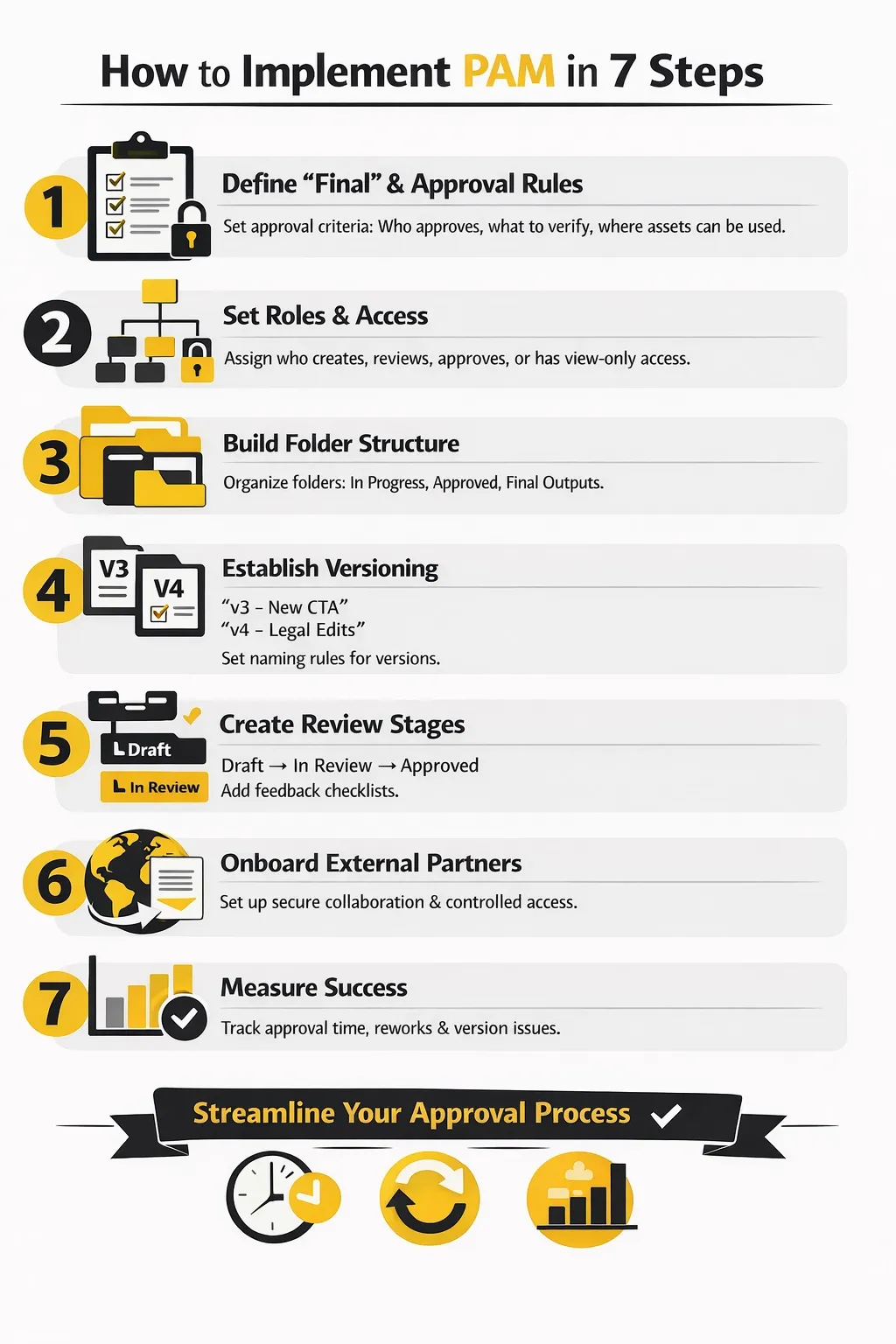
Step 1: Define “final” and approval rules
Start by making “final” a real status, not a feeling. Decide what approval means in your team: who approves, what needs to be checked (brand, legal, product accuracy), and when an asset can be used externally. If you work across regions or channels, define that too — “approved for website” isn’t always “approved for paid ads” or “approved for retail partners.”
Step 2: Set roles and access
Before you upload everything, map the people involved in production. Who creates, who reviews, who approves, and who only needs view access? The goal is to keep production moving without opening the entire library to everyone. A good setup gives creators freedom to iterate, reviewers an easy way to comment, and approvers a clear “this is the version I’m signing off on” moment.
Step 3: Build folder/collection structure for production
Your production structure should mirror how work actually happens. Most teams do best when drafts live in an obvious “in progress” space, and approved outputs are separated from work-in-progress. Keep it consistent across campaigns and projects so people don’t reinvent the structure every time. If your team constantly asks, “Where does this go?”, the structure is too clever.
Step 4: Set versioning conventions
This is where you kill “final_final.” Decide what counts as a new version (any export? only meaningful changes?), how versions get named or described, and how you capture context data. A short version note like “new headline + updated CTA color” is often the difference between instant clarity and 20 minutes of guessing later. If parallel edits are common, define how you label branches (e.g., “v4 — legal edits” vs “v4 — regional variant”).
Step 5: Create review stages and templates
Keep your workflow stages simple enough that people will actually use them. A small set like Draft → In review → Changes requested → Approved is usually plenty. Then add lightweight templates that reduce back-and-forth: a standard checklist for reviewers (brand, claims, disclaimers, product accuracy), and a feedback template that encourages actionable notes instead of vague “make it pop.”
Step 6: Onboard external partners
External partners should be able to participate without gaining broad access. Set up a dedicated collaboration flow: how they upload drafts, receive feedback, and deliver revisions. Use controlled share links and clear rules (“only download approved assets,” “comment on the latest version,” “don’t re-upload as a new file — save as a revision”). This prevents the common “agency sent an updated ZIP, now we have two sources of truth” problem.
Step 7: Measure success (metrics to track)
Pick a few metrics that reflect real pain and make improvement visible. Track how long approvals take, how often assets get reworked, and how often teams ship the wrong version or need to redo work due to missing context. If you can show faster cycle time and fewer rework loops within a month, adoption becomes much easier — and the investment becomes easier to justify.
Conclusion
PAM is worth it when production becomes a system: multiple stakeholders, frequent revisions, external collaboration, and real risk in shipping the wrong asset. The goal isn’t more process — it’s less chaos, faster approvals, and a clear path from draft to publish-ready.
Next step: use the checklist above to evaluate tools, then run a small pilot on one real workflow (a campaign or a product content update). If it reduces approval time and rework in a couple of weeks, you’ve got your business case.
FAQ
What’s the difference between PAM and DAM?
PAM is about the creation stage — versions, reviews, approvals, and keeping work-in-progress under control. DAM is about the library stage — search, metadata, rights, governance, and making approved assets easy to reuse and share safely. Many teams run both as one connected workflow: PAM-style controls during production, DAM-style governance for the approved library.
How does PAM handle parallel edits?
Good PAM setups make parallel work explicit. Instead of two people overwriting each other (or creating “v_final_THIS_ONE”), you can keep multiple revisions visible, compare them, and choose which one becomes the approved line. The key is that comments and approvals stay tied to a specific version, so feedback doesn’t drift across iterations.
What metrics prove PAM ROI?
The most convincing metrics are operational and easy to measure: faster approval cycle time, fewer revision loops, fewer “wrong file shipped” incidents, less time spent searching for the latest version, and fewer internal pings like “can you resend the approved one?” If those drop, you’ll feel the ROI in both speed and team bandwidth.
Is Production Asset Management the same as a proofing, review, and approval tool?
Not exactly. Proofing tools focus on collecting feedback and approvals, but they don’t always provide full version history, approval audit trails, handoff controls, and governance across a production library. PAM is broader: it connects revisions, comments, statuses, and approved outputs into a reliable workflow.
Can a DAM replace PAM?
Sometimes, if your DAM includes strong versioning + approvals and your production workflows are relatively simple. But when you have parallel edits, frequent iterations, multiple approvers, or external partners, “DAM-only” setups often turn into libraries with drafts mixed in. PAM-style workflow controls are what keep production traceable.
Did you enjoy this article? Give Pics.io a try — or book a demo with us, and we'll be happy to answer any of your questions.
Author

Eugene is a product manager in the DAM space with hands-on experience across sales, logistics, and customer support. He holds a Master’s degree in International Economics and combines it with practical frontend and analytics skills to build DAM features that match real team workflows.


