

In this article, you’ll learn:
Content is king. And it should look just as royal.
Content quality isn't always determined solely by creativity. While writing and design skills are certainly important, sometimes even the best idea can be thwarted by imprecise workflows. This gets worse when too many people are involved in approvals and the content queue keeps growing.
Reviews drag on, edits pile up, and small mistakes start slipping through. A better workflow helps keep the process moving without turning every piece into a long approval cycle.
Content production workflow at a glance
| Step | What you define | Main owner | Main output |
|---|---|---|---|
| 1. Goal | Why this content exists and what it should achieve | Content lead/strategist | Clear objective, audience, format, success metric |
| 2. Tasks | Every action required to get the content live | Content manager | Full task list with no hidden steps |
| 3. Roles | Who owns each task | Content manager/team lead | Clear responsibility for every step |
| 4. Order | What happens first, what can run in parallel, what blocks the next step | Content manager/project owner | A workable production sequence |
| 5. Timeline | How long each step should take and when it is due | Project owner | Deadlines, review windows, publish date |
| 6. Files, handoffs, and publishing | Where assets live, how they move, and how they reach live channels | Marketing ops/ asset owner | Approved files, clean handoffs, publish-ready delivery |
What is a content production workflow?
A content production workflow is how content moves through the team: from the first brief to the final approved version.
It answers six practical questions:
- What is this content meant to do?
- What tasks need to happen?
- Who owns each task?
- In what order does the work move?
- How long should each step take?
- Where do files and approved assets live?
If those six things are clear, content moves faster and breaks less often.
Step 1: Set the goal before production starts and list every task required to get it live
Content for the sake of content is a losing strategy. Every image, video, and text must convey a specific meaning. What exactly do you want to tell or show your potential customers? Why should they trust you and buy from you?
Smart content management helps build awareness, increase sales, and build trust. With content, you control attention and decide what specifically they should know about you and how much they should buy from you.
The point is to choose one specific goal so the team knows what success looks like.
For each piece, define:
- the business goal
- the audience
- the format
- the main topic or keyword
- the primary channel
- the success metric
A blog post built to rank in search should not be planned the same way as a customer story built for sales follow-up or a visual campaign asset built for paid distribution.
Step 2: Set deadlines
After the previous step, you have a specific list of content you need to create. You understand how many videos, images, and text you need for your next advertising campaign.
The next step is to determine when each piece of content needs to be ready. For example, a video should be released on YouTube on Tuesday, April 20th, and the advertising campaign should launch three days later.
This will help you accurately determine the number of creative workers, and they will better determine their workload and speed. You can break each task down into stages to better control the content creation process and, if necessary, add additional workers to ensure everything is completed on time. In addition, incorporating an AI content detector during the review process can help ensure your content remains original and meets quality standards.
For example, if a blog post goes live on Tuesday, the workflow might look like this:
- Tuesday: publish;
- Monday: final QA and scheduling;
- Friday: final approval;
- Wednesday to Thursday: editing and SEO review;
- Monday to Tuesday: first draft;
- Previous Friday: brief approval and asset planning.
Step 3: Assign one owner to each task
A workflow only works when responsibility is clear. Each task should have one directly responsible owner. Other people can review, support, or approve, but one person should be accountable for moving that step forward.
Roles and responsibilities
| Role | Owns | Key question |
|---|---|---|
| Content strategist/marketing lead | Goals, priorities, content direction | Are we creating the right thing? |
| Content manager/editorial lead | Workflow, deadlines, briefs, handoffs | Is the process moving on time? |
| Writer/SME | Draft creation and revisions | Is the brief clear enough to execute? |
| Designer/creative | Visual assets, layouts, graphics, exports | Do I have the right inputs early enough? |
| SEO specialist | Search intent, keyword alignment, metadata | Is this set up to rank and get found? |
| Editor/reviewer | Structure, clarity, quality, consistency | Is this ready for approval? |
| Publisher/marketing ops | CMS upload, QA, scheduling, distribution | Is this ready to go live without errors? |
On a small team, one person may wear several hats. That is fine. What matters is that each step still has a named owner.
Step 4: Define the order of work and the handoff points
The same deadline does not mean the same workload. Some pieces are quick to turn around. Others take more production time, more people, and more reviews. That needs to be clear in the plan from the start.
A workable order should show:
- what has to happen first
- what can happen in parallel
- what input is needed before the next step starts
- what file, status, or approval marks a handoff as complete.
Step 5: Review windows, and turnaround rules
Reviews are often the least disciplined part of the workflow, which is why they cause the most delay.
Set simple rules such as:
- who reviews
- what kind of feedback they can give
- how long they have to respond
- what happens if they miss the deadline
Without that, the team keeps waiting because nobody knows when silence means approval and when silence means risk. Be sure to define the format in which edits and approvals are provided and at what point the content is considered fully ready for use.
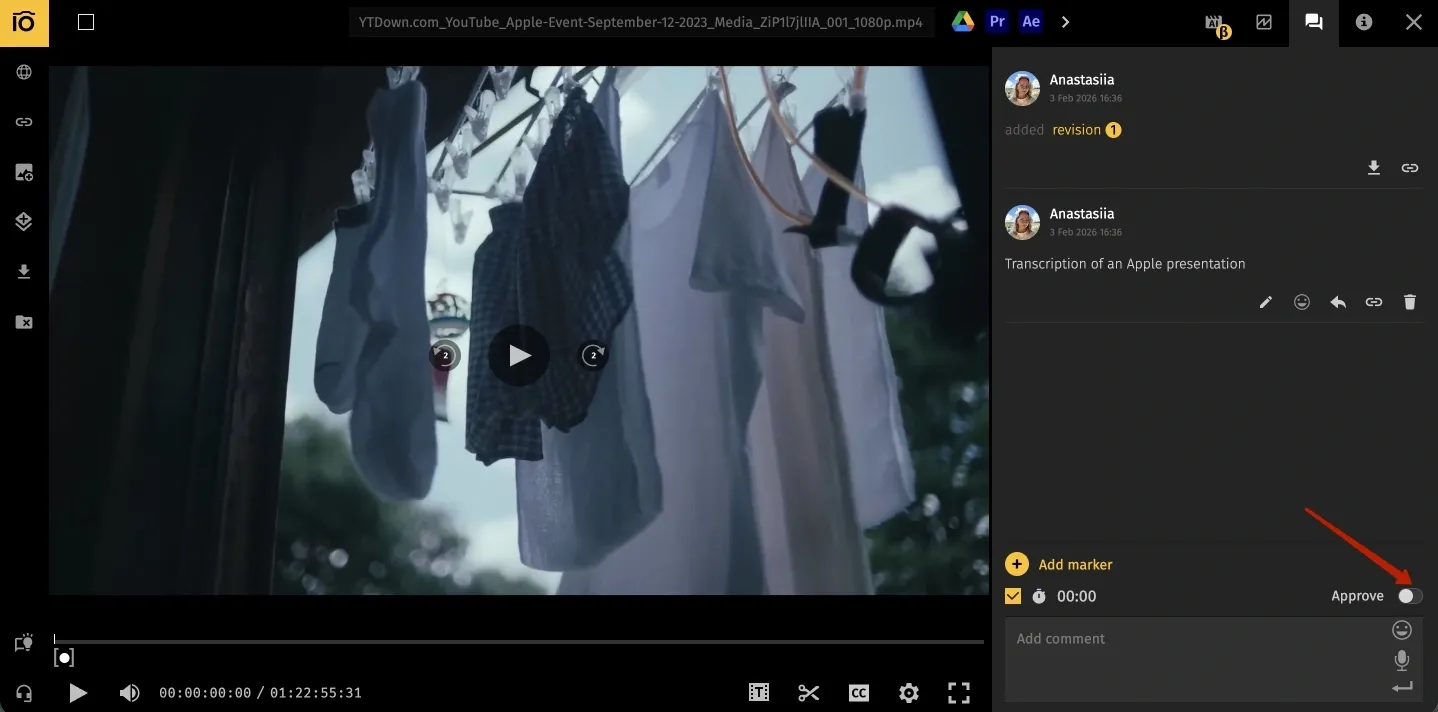
This is usually the point where teams feel the cost of scattered feedback. When comments live in one tool, approvals in another, and the final assets somewhere else, review takes longer than it should. A tool like Pics.io can make that stage easier by keeping versions, comments, and approval status tied to the assets themselves.
Step 6: Organize files, manage asset handoffs, and make publishing easier
For teams publishing across multiple channels, efficient content production depends on clean approvals, version control, and publish-ready assets.
Draft visuals, approved visuals, resized exports, social crops, web-ready files, and final published versions should not be mixed into one confusing folder structure. If they are, every downstream step gets slower.
File storage and handoff rules
| Stage | What should live here | Owner | “Ready” means |
|---|---|---|---|
| Brief stage | Brief, keyword notes, asset requirements, references | Content manager | Scope is approved and asset needs are visible |
| Draft stage | Working copy, comments, source links | Writer/editor | Draft is ready for review |
| Visual production | Design source files, selected images, edit versions | Designer/creative | Assets match the brief and are reviewable |
| Approved asset stage | Final approved images, graphics, exports, rights info, status labels | Asset owner/marketing ops | File is safe to publish and easy to find |
| Publishing stage | CMS-ready files, alt text, metadata, channel-specific versions | Publisher/marketing ops | Content can go live without more rework |
| Post-publish stage | Published URLs, archived assets, reusable derivatives | Content manager/asset owner | Team can reuse or update later |
With a small team, it is still possible to keep track of the right file by memory. That stops working once the volume grows. More assets and more contributors usually mean more confusion around what is final, approved, and ready to publish.
This is where a DAM becomes practical, not theoretical. If your team already works in Google Drive or Amazon S3 but needs better control over approved assets, a DAM can keep files searchable, versioned, status-marked, and easier to hand off across contributors. It also supports approvals, metadata, AI-assisted tagging, and file conversion, which helps when one asset needs different outputs for blog, email, social, or partner use.
That is also where renditions help. Different channels need different dimensions, formats, and weights. Even if you've approved a particular visual, you'll need to change the size across different channels. If the team has to manually re-export the same visual every time it moves from article to social post to campaign page, publishing becomes slower than it should be. Predefined converted versions keep that step lighter.
Publishing also depends on delivery speed. If your workflow includes lots of images or campaign visuals, a CDN can help approved media reach websites and campaigns faster by serving files from locations closer to the user and optimizing delivery. Pics.io has an optional image CDN add-on, which fits naturally into the publishing stage when the team wants fewer manual steps between approved asset and live experience.
Finally, do not stop the workflow at publish. Add two more decisions:
- where this content will be reused
- when it should be reviewed or updated
That is how a workflow creates compounding value instead of one-off output.
Common workflow problems and how to fix them
Briefs are too vague
What happens: first drafts miss the mark, and revision rounds multiply.
Fix: make the brief template more specific. Add audience, goal, angle, required sections, SEO notes, and asset needs.
Approvals take too long
What happens: content sits in review and deadlines slip.
Fix: reduce the number of approvers and set response windows with clear deadlines.
Assets are hard to find
What happens: teams use outdated files or waste time hunting for final versions.
Fix: keep one source of truth for approved assets, with status labels, version control, and searchable metadata.
Publishing is too manual
What happens: the team repeats resizing, exporting, and uploading work for every channel.
Fix: standardize renditions and connect approved media delivery to the publishing process.
Nobody knows what is blocked
What happens: work stalls, but the reason becomes visible only near the deadline.
Fix: review the workflow weekly and track blockers by stage, not only by content piece.
Final thoughts
Even great ideas can get bogged down in a weak process. If the team is unclear on what needs to be made, who owns it, or what “done” looks like, production slows down fast.
A better workflow makes experimentation easier because the team can try new content without rebuilding the process every time.
FAQ
What is a content production workflow?
It is the path content follows from idea to publication. It includes briefing, creation, revisions, approvals, and review.
What is the difference between content strategy and content workflow?
Strategy answers why you are creating the content and who it is for. Workflow answers how it actually gets made without turning into a mess.
Who should own the workflow?
Usually one person needs to hold the process together. That might be a content manager, editorial lead, or marketing ops owner. The work can be shared, but the process still needs an owner.
Do small teams really need a workflow?
Yes, often more than big teams. When the same few people are writing, reviewing, designing, and publishing, even small confusion gets expensive fast.
When does a DAM start to matter?
Usually when content volume grows and assets start moving across too many people and channels. That is when file search, version control, approvals, and ready-to-use outputs stop being “nice to have.”
Did you enjoy this article? Give Pics.io a try — or book a demo with us, and we'll be happy to answer any of your questions.


